


Quick Answer: How to Complete a W-9 Form
To complete a W-9:
- Download the official W-9 PDF from IRS.gov.
- Open the file in a PDF esigner.
- Enter your legal name, business information, address, and taxpayer identification number.
- Select the correct federal tax classification.
- Add your electronic signature and date.
- Review the information and download the completed PDF.
- Send the signed W-9 to the requester.
The form is used by businesses to collect your taxpayer information for reporting purposes. It is not a tax return and does not get filed directly with the IRS.
W9 Form Download
When you need a w9 form download, the safest option is always the IRS website.
Search for “Form W-9” on IRS.gov and download the current PDF version. The IRS provides this form for free, and using the official version helps avoid problems caused by outdated templates or modified copies.
You may find many websites offering W-9 templates, but not every copy online is guaranteed to be current. Tax forms are not something you want to guess about, especially when the form includes your SSN, EIN, or other identifying information.
Before filling out the form, check:
| Check | Why It Matters |
|---|---|
| Downloaded from IRS.gov | Ensures you have the official version |
| Correct form name | The official title is “Request for Taxpayer Identification Number and Certification” |
| Current PDF version | Prevents using an outdated template |
| Blank copy saved | Useful if another client requests a W-9 later |
A small tip: keep the blank form separate from completed copies. You may need to provide different versions in the future if your address, business structure, or tax information changes.
Download Fillable W9 Form & Fill It Out Online
A printed W-9 still works, but for most freelancers and businesses, completing the form digitally is faster.
If you need to fill out W9 online, the workflow is simple:
- Download the official W-9 form.
- Upload it into a PDF esigner.
- Add your information using the text tool.
- Select checkboxes for the correct tax classification.
- Add your signature.
- Insert the date.
- Finish and download the completed PDF.
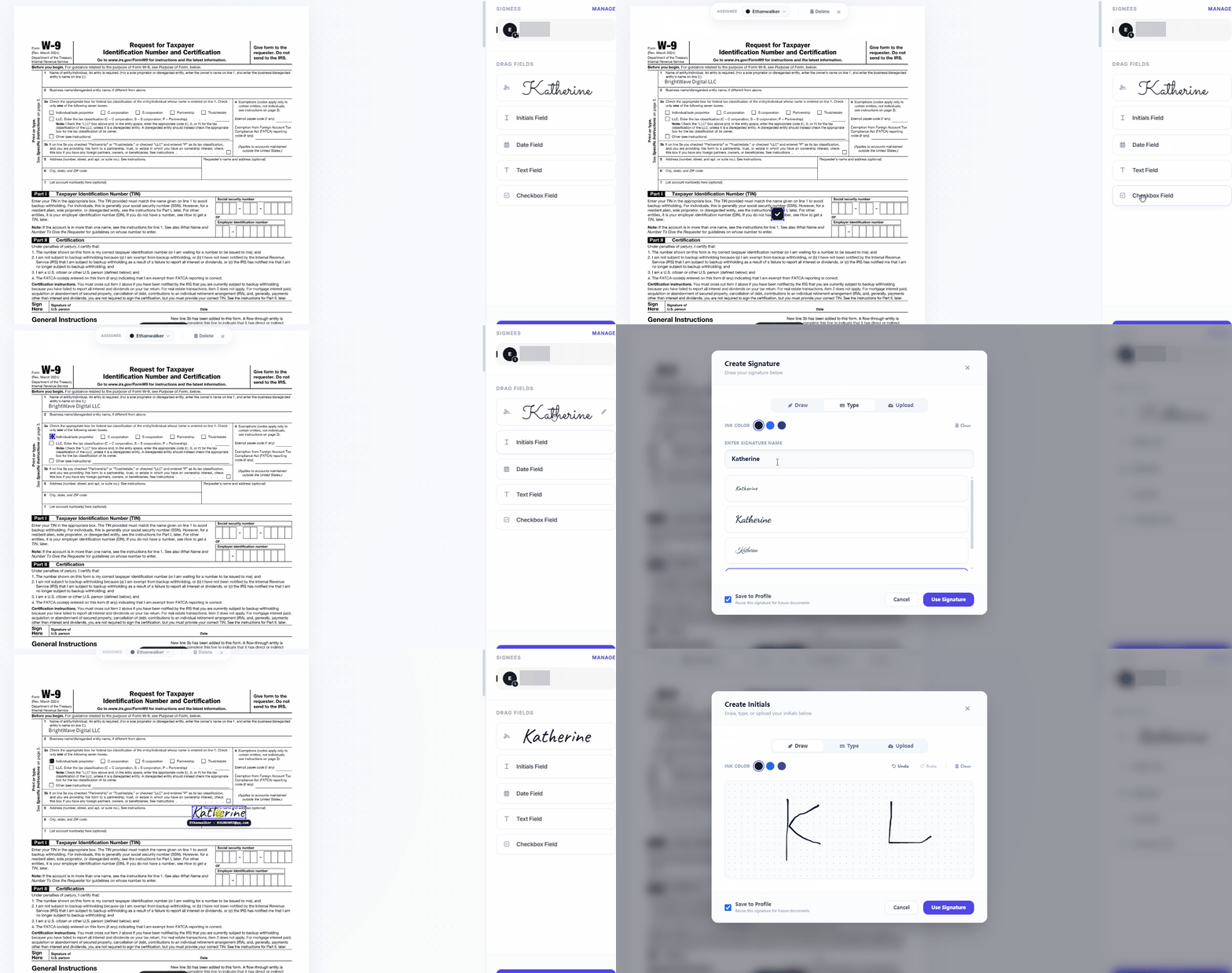
Using an editable PDF also makes small corrections much easier. If you notice a spelling mistake in your address or select the wrong option, you can fix it immediately instead of printing another copy.
A typical online signing process includes:
Add Text
Use the text tool to enter:
- Legal name
- Business name (if applicable)
- Address
- Tax identification number
Add Checkbox
The tax classification section requires selecting the option that matches your situation. Adding a checkbox directly to the PDF avoids unclear handwritten marks.
Add Signature
Most PDF editors allow different signature styles:
- Draw your signature
- Type your name with a signature font
- Drag your signature to the form signing area
Add Date
Enter the signing date directly into the form so the document shows when it was completed.
This gives you a ready-to-send download fillable W9 form without printing or scanning.
What Is a W-9 Form Used For
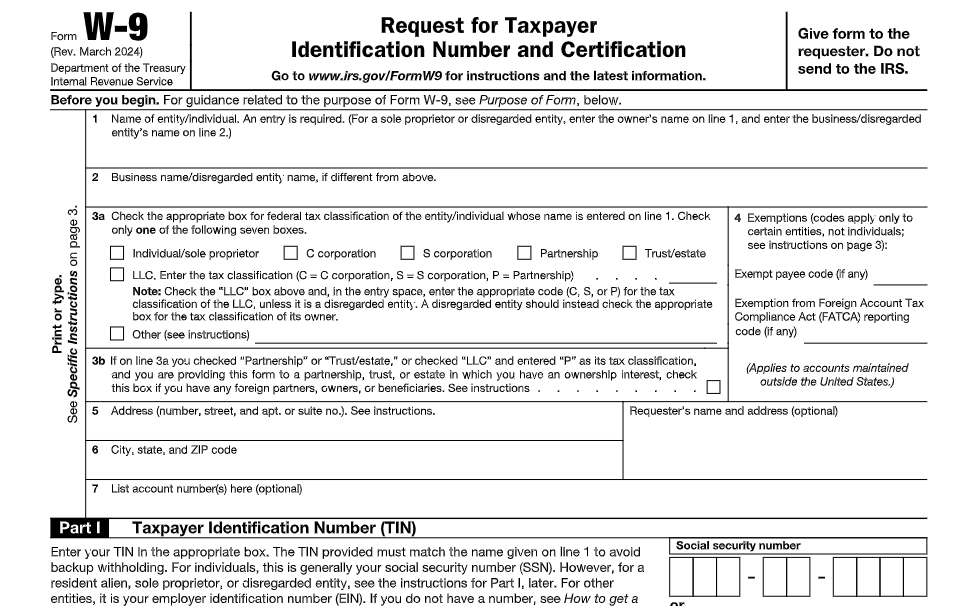
The official name of Form W-9 is Request for Taxpayer Identification Number and Certification.
In simple terms, it allows a person or business paying you to collect the information they need for tax reporting.
A company may request a W-9 before paying:
- Freelancers
- Independent contractors
- Consultants
- Vendors
- Self-employed workers
- Certain business entities
For example, imagine you complete a freelance design project and send your invoice. Before the company releases payment, their accounting team may ask for a W-9. They are not asking because you owe taxes immediately. They need your information so they can correctly report payments if required.
The W-9 helps the payer prepare forms such as a 1099-NEC when applicable.
How to Fill Out a W9 Exactly
The easiest way to understand how to fill out a W9 is to go through each section in order.
Most mistakes happen because people enter information that seems correct but does not match their tax records.
For example, a freelancer might use a brand name everywhere online, but the W-9 asks for the legal name connected to tax reporting. Those two names are not always the same.
Line 1: Name
Enter your legal name exactly as it appears on your federal tax return.
This is the name the IRS associates with your taxpayer identification number.
For individuals, this is usually your personal name.
Example:
Correct:
Sarah Miller
Not usually correct:
Sarah Miller Design
unless that is the legal name used for tax purposes.
A common mistake is entering a company name, website name, or nickname on Line 1. If your client later prepares a 1099, mismatched information can create unnecessary questions.
Line 2: Business Name or Disregarded Entity Name
This line is optional.
Use it if you operate under a different business name from your legal name.
Example:
Line 1:
John Davis
Line 2:
Davis Photography Studio
If you don’t have a separate business name, leaving this blank is usually fine.
Many individual freelancers leave this section empty because they invoice clients under their own legal name.
Line 3: Federal Tax Classification
This is one of the sections where people often stop and double-check their answer. The correct choice depends on how you are recognized for federal tax purposes, not simply what you call your work.
The most common options include:
- Individual/sole proprietor
- C Corporation
- S Corporation
- Partnership
- Trust or estate
- Limited Liability Company (LLC)
For many freelancers working under their own name, the answer is usually Individual/sole proprietor.
For example:
- A freelance writer receiving payments under their own name → usually Individual/sole proprietor
- A registered corporation → usually selects the applicable corporation classification
- An LLC → depends on how the LLC is taxed
The important part is not choosing the option that “sounds closest.” It should match your actual tax setup.
If you recently created an LLC, elected S-Corp status, or changed your business structure, this is one area where checking with a tax professional can save you from correcting paperwork later.
Line 4: Exemptions
Most individuals leave the exemption fields blank.
These sections are mainly for certain entities that qualify for exemption from backup withholding or specific reporting requirements.
If you are a typical freelancer, independent contractor, or small business owner completing a W-9 for a client, you probably do not need to enter anything here.
Lines 5 and 6: Address
Enter the address where you receive important tax-related documents.
This is usually your current mailing address.
Include:
- Street address
- Apartment or unit number (if applicable)
- City
- State
- ZIP code
A surprisingly common mistake is using an old address saved in an invoice system or business account.
If you moved recently, update this section before sending the form. Otherwise, future tax documents could be mailed somewhere you no longer receive mail.
Part I: Taxpayer Identification Number (TIN)
The next section asks for your taxpayer identification number.
This is usually one of two things:
| Situation | Usually Used |
|---|---|
| Individual freelancer | Social Security Number (SSN) |
| Business entity | Employer Identification Number (EIN) |
If you are completing the form as yourself and do not have an EIN, using your SSN is common.
Some freelancers choose to apply for an EIN because they prefer not to share their SSN with multiple clients. Whether you should do that depends on your situation.
The most important thing is consistency. The number you enter must belong to the taxpayer listed on the form.
Double-check every digit before signing. A small typo here can create issues when the payer submits tax reporting information.
Part II: Certification and Signature
The final step is signing the W-9.
Your signature confirms that the information provided is accurate and that you are certifying your taxpayer status.
If you use an editable W9 form, you can usually complete this step electronically.
An online PDF editor allows you to:
- Add a typed signature
- Draw a signature with your mouse or touchscreen
- Upload a signature image
- Add the signing date
Electronic signing is especially convenient for remote work. A freelancer working with clients in different states—or even different countries—does not need to print a document, sign it, scan it, and send it back.
After signing:
- Review every section.
- Confirm your name matches your tax records.
- Check your SSN or EIN.
- Make sure the correct tax classification is selected.
- Complete the signing process.
- Download the finished PDF.
Now you have a completed W-9 ready to send.
Fill Out a W-9 Form for Individual
Many people searching for how to fill out a w 9 form for individual are freelancers or independent contractors completing their first tax form.
The process is usually straightforward.
A typical individual W-9 looks like this:
| Section | What an Individual Usually Enters |
|---|---|
| Name | Your legal name from your tax return |
| Business name | Only if you use a separate business name |
| Tax classification | Individual/sole proprietor |
| Exemptions | Usually left blank |
| Address | Current mailing address |
| TIN | SSN or EIN |
| Signature | Your electronic or handwritten signature |
| Date | Date you sign the form |
Let’s say you are a freelance video editor who receives payments from several clients.
You might not have a registered company. You may simply work under your own name.
In that situation, your W-9 may only require:
- Your legal name
- Your address
- Individual/sole proprietor selection
- SSN
- Signature
You do not need to create an LLC or register a business just because someone requested a W-9.
Common Mistakes
Most W-9 problems are caused by small details rather than complicated tax issues.
Here are mistakes worth checking before sending your form.
| Mistake | Why It Causes Problems |
|---|---|
| Using a nickname | The name may not match IRS records |
| Putting a brand name on Line 1 | Line 1 requires the taxpayer’s legal name |
| Selecting the wrong tax classification | Can affect reporting information |
| Forgetting the signature | The form is incomplete |
| Entering the wrong SSN/EIN | Creates reporting mismatches |
| Sending the W-9 to the IRS | The requester keeps the form, not the IRS |
One mistake that happens often: people assume the business name is always the most important information.
It is not.
The name connected to your taxpayer identification number matters most.
For example, if your Instagram account says “Creative Studio” but your tax records are under your personal name, your personal legal name belongs on Line 1.
W-9 vs W-8 vs W-4: What’s the Difference?
These forms are easy to confuse because they all involve tax information, but they serve different purposes.
| Form | Purpose | Who Usually Completes It |
|---|---|---|
| W-9 | Provides taxpayer information for U.S. persons | U.S. individuals and businesses |
| W-8BEN | Confirms foreign individual status | Non-U.S. individuals |
| W-8BEN-E | Confirms foreign business status | Non-U.S. entities |
| W-4 | Provides employee withholding information | Employees |
| 1099-NEC | Reports contractor payments | Businesses issuing contractor payments |
A simple way to remember:
- W-9 → “I am a U.S. taxpayer, here is my information.”
- W-8 → “I am not a U.S. taxpayer.”
- W-4 → “I am an employee, manage my withholding.”
FAQ
Where can I download a W-9 form?
You can get the official W-9 form download directly from IRS.gov. The IRS provides the form free of charge.
Avoid using random PDF copies because you may not know whether they are current.
Can I fill out W9 online?
Yes. You can fill out W9 online by downloading the official PDF and opening it with an online PDF editor.
You can add text, select checkboxes, insert a signature, add the date, and save the completed file as a PDF.
Is an editable W9 form accepted?
In most situations, yes. An editable W9 form is commonly used because it is faster than printing and scanning.
However, some organizations may have their own submission requirements, so follow the instructions provided by the requester.
Do I send my completed W-9 to the IRS?
No.
The person or company requesting your W-9 keeps the form for their records. You do not normally submit it directly to the IRS.
How long is a W-9 valid?
A W-9 does not usually expire every year.
You may need to provide a new one if important information changes, such as:
- Legal name
- Business structure
- Address
- Taxpayer identification number
Do freelancers need a W-9?
Many freelancers receive W-9 requests from clients before getting paid.
If a business needs your taxpayer information to report payments, they may ask you to complete one.
Can I sign a W-9 electronically?
Yes, electronic signatures are commonly used for digital W-9 forms.
Before signing, make sure the information is correct because your signature confirms the accuracy of the form.
What happens if I make a mistake on my W-9?
If you notice an error, complete a corrected W-9 and provide the updated version to the requester.
Do not simply cross out information and send a changed copy unless the requester specifically accepts that format.
Final Checklist Before Sending Your W-9
Before you send your completed form, check:
✓ Downloaded the form from IRS.gov
✓ Legal name matches your tax records
✓ Correct tax classification selected
✓ Address is current
✓ SSN or EIN is correct
✓ Signature added
✓ Date included
✓ Saved a copy for your records
Completing a W-9 is not complicated, but accuracy matters. Most delays happen because of small mismatches—an outdated address, missing signature, or incorrect taxpayer information.
If you start with the official w9 form download, use an editable W9 form, and review each section before sending it, the entire process can usually be completed in just a few minutes.




Leave a Comment