


Best Prompts for Realistic Photos
1. Cinematic Street Photography
Prompt:
Create a cinematic street photo of a young woman walking through a rainy city at night. Neon signs reflect on the wet pavement, people move naturally in the background, and soft rain is visible under the streetlights. Use realistic skin texture, natural proportions, shallow depth of field, and a 35mm photography look.
2. Golden Hour Travel Photo
Prompt:
Generate a realistic travel photograph of a traveler standing on a cliff overlooking the ocean during golden hour. Warm sunlight comes from behind the subject, creating natural rim lighting. Include realistic rocks, moving waves, light clouds, and subtle atmospheric haze. Make it look like a professional DSLR travel photo.
3. Cozy Coffee Shop
Prompt:
Create a realistic photo of a cozy independent coffee shop on a quiet morning. Show wooden tables, warm pendant lights, freshly brewed coffee, books, indoor plants, and sunlight coming through large windows. Use natural colors and documentary-style photography rather than an overly polished commercial look.
4. Luxury Hotel Room
Prompt:
Create a photorealistic luxury hotel bedroom overlooking a modern city skyline. Include a king-size bed, premium white bedding, warm bedside lighting, floor-to-ceiling windows, subtle marble details, and elegant furniture. Shoot from a wide-angle interior photography perspective with natural proportions.
5. Food Photography
Prompt:
Create a high-end food photograph of freshly made pancakes topped with strawberries, blueberries, butter, and maple syrup. Place them on a ceramic plate on a wooden breakfast table. Use soft window lighting, natural shadows, visible food texture, shallow depth of field, and realistic colors.
Best Prompts for Portraits
6. Professional LinkedIn Portrait
Prompt:
Create a realistic professional headshot of a confident 30-year-old business professional wearing a dark navy blazer and simple white shirt. Use a neutral gray studio background, soft flattering lighting, natural skin texture, subtle expression, and realistic facial proportions. Frame from the chest upward.
7. Outdoor Lifestyle Portrait
Prompt:
Create a natural lifestyle portrait of a young woman sitting outside a café in Paris. She is wearing casual neutral-colored clothes and looking slightly away from the camera. Use soft afternoon sunlight, realistic skin texture, gentle background blur, candid body language, and a 50mm photography look.
8. Dramatic Studio Portrait
Prompt:
Generate a dramatic studio portrait of a man wearing a black turtleneck against a dark background. Use one large softbox from the side to create strong light and shadow across the face. Preserve realistic pores, hair texture, facial proportions, and subtle imperfections.
9. Graduation Portrait
Prompt:
Create a realistic graduation portrait of a university student wearing a black graduation gown and cap while standing on a university campus. Use warm spring sunlight, trees and academic buildings softly blurred in the background, natural facial expression, and authentic photography.
10. Creative Fashion Portrait
Prompt:
Create a fashion editorial portrait of a model wearing a minimalist silver outfit in a futuristic white studio. Use directional lighting, bold geometric shadows, clean composition, subtle metallic reflections, and realistic fabric texture. Make the result look like a premium magazine fashion shoot.
Best Prompts for Product Photography
11. Minimalist Product Photo
Prompt:
Create a premium studio product photograph of [PRODUCT] placed in the center of a clean beige background. Use soft diffused lighting, realistic shadows, subtle reflections, and generous negative space. Keep all product proportions, colors, packaging details, and branding accurate.
12. Luxury Cosmetic Ad
Prompt:
Create a luxury advertisement for a skincare serum bottle. Place the bottle on a translucent glass platform surrounded by small water droplets. Use soft cream and gold lighting, elegant shadows, realistic glass reflections, and premium beauty-ad photography. Leave space at the top for a headline.
13. Tech Product Launch
Prompt:
Create a futuristic product launch image for a wireless earbud case. Show the case floating slightly above a dark reflective surface with subtle blue-white studio lighting. Use sharp product details, realistic materials, controlled reflections, dramatic contrast, and a premium consumer electronics advertising style.
14. Beverage Advertisement
Prompt:
Create a refreshing commercial product photo of a cold lemon sparkling-water can surrounded by ice cubes, lemon slices, water droplets, and splashes. Use bright studio lighting, crisp textures, realistic condensation, and an energetic summer advertising look.
15. E-commerce Product Image
Prompt:
Create a clean e-commerce product photo of [PRODUCT] on a pure white background. Keep the entire product visible and centered. Preserve accurate dimensions and colors. Use soft realistic shadows underneath the object with no unnecessary decorations or text.
Best Prompts for YouTube Thumbnails
16. AI Tool YouTube Thumbnail
Prompt:
Create a high-click YouTube thumbnail about AI tools. Show a surprised creator on the right looking toward a glowing futuristic AI interface on the left. Add large readable text: “THIS CHANGES EVERYTHING”. Use strong contrast, expressive emotion, dramatic lighting, and a clean 16:9 composition.
17. Before-and-After Thumbnail
Prompt:
Create a YouTube thumbnail showing a dramatic before-and-after image transformation. Split the image vertically. The left side should look dull, blurry, and poorly lit, while the right side should look sharp, bright, and professional. Add bold readable text: “BEFORE → AFTER”. 16:9.
18. Tutorial Thumbnail
Prompt:
Create a clean YouTube tutorial thumbnail for “How to Edit YouTube Thumbnails”. Show a thumbnail design interface in the background and a cursor editing large text. Add the headline “EDIT ANY THUMBNAIL” in large bold letters. Make the layout easy to understand even on a small mobile screen.
19. Money/Business Thumbnail
Prompt:
Create an energetic YouTube thumbnail about making money online with AI. Show a laptop displaying an AI interface, floating dollar symbols, and a creator reacting with excitement. Add large text: “AI = $$$?” Keep the design clean, high contrast, and optimized for 16:9 YouTube display.
20. Comparison Thumbnail
Prompt:
Create a professional YouTube comparison thumbnail for “[TOOL A] vs [TOOL B]”. Place the two product interfaces on opposite sides with a glowing VS symbol in the center. Use contrasting backgrounds, bold readable text, clear visual hierarchy, and dramatic lighting. 16:9.
Best Prompts for Social Media Posts
21. Instagram Quote Post
Prompt:
Create a modern square Instagram quote graphic using the text: “[QUOTE]”. Use a minimalist editorial layout, warm neutral background, elegant typography, subtle abstract shapes, and generous spacing. Make the text perfectly readable and visually balanced. 1:1.
22. Instagram Carousel Cover
Prompt:
Design an Instagram carousel cover titled “10 AI Tools You Should Try”. Use a clean modern tech style, bold headline typography, small colorful 3D icons, subtle gradients, and a strong visual hierarchy. Keep the title easy to read on a phone screen. 4:5.
23. Threads Social Graphic
Prompt:
Create a simple social media graphic titled “8 AI Tools I Use Every Week”. Use a bright background, large black headline, small tool-inspired icons arranged neatly around the text, and a clean modern internet aesthetic. Avoid visual clutter. 4:5.
24. Pinterest Graphic
Prompt:
Create a vertical Pinterest graphic titled “25 Productivity Hacks That Actually Work”. Use a soft lifestyle background with a laptop, notebook, coffee, and desk accessories. Add large readable headline text with a clean editorial design. 2:3 vertical format.
25. LinkedIn Business Graphic
Prompt:
Create a professional LinkedIn graphic about “5 AI Trends to Watch in 2026”. Use a minimal corporate design with dark blue gradients, subtle futuristic graphics, clean typography, and five small visual elements representing each trend. Keep the design polished and credible.
Best Prompts for Posters and Ads
26. Movie Poster
Prompt:
Create a cinematic science-fiction movie poster titled “BEYOND MARS”. Show a lone astronaut standing on a red planet looking toward a mysterious glowing structure in the distance. Use dramatic lighting, atmospheric dust, epic scale, realistic textures, and professionally composed movie-poster typography.
27. Event Poster
Prompt:
Create a modern technology summit poster titled “Future AI Summit 2026”. Include the subtitle “San Francisco · October 20–22”. Use futuristic geometric forms, subtle glowing gradients, sophisticated typography, dark background, and a premium conference-design aesthetic.
28. Summer Sale Ad
Prompt:
Create a colorful promotional graphic for a summer sale. Add the headline “SUMMER SALE — UP TO 50% OFF”. Use bright sunlight, tropical elements, playful shadows, bold typography, and a clean commercial layout. Leave a clearly visible area for a CTA button.
29. Restaurant Poster
Prompt:
Create an elegant restaurant poster promoting a new Italian dinner menu. Show handmade pasta, tomatoes, basil, olive oil, and a glass dining table in warm evening lighting. Add the text “A Taste of Italy” with sophisticated typography and an upscale restaurant aesthetic.
30. Fitness Ad
Prompt:
Create a powerful fitness advertisement showing an athlete training in a modern gym. Use dramatic side lighting, visible motion, realistic sweat and skin texture, and strong contrast. Add the headline “BUILD YOUR STRONGEST SELF” in large clean typography.
Best Prompts for Illustrations
31. Children’s Book Illustration
Prompt:
Create a colorful children’s book illustration of a small fox exploring a magical forest filled with glowing mushrooms, butterflies, flowers, and friendly woodland animals. Use soft shapes, expressive characters, warm colors, charming details, and a playful hand-drawn storybook aesthetic.
32. Fantasy Landscape
Prompt:
Create an epic fantasy landscape featuring an ancient castle built into huge mountain cliffs above the clouds. Waterfalls flow from floating islands while dragons fly in the distance. Use dramatic atmospheric lighting, enormous scale, rich environmental details, and cinematic composition.
33. Retro Travel Illustration
Prompt:
Create a vintage travel-poster illustration of California’s Pacific Coast Highway. Show a classic convertible driving beside ocean cliffs during sunset. Use simplified geometric shapes, warm retro colors, subtle paper texture, and 1960s travel-poster inspiration.
34. Isometric City
Prompt:
Create a detailed isometric illustration of a small futuristic sustainable city. Include solar panels, green roofs, electric buses, parks, bike lanes, modern buildings, and pedestrian areas. Keep the scene clean, organized, colorful, and easy to understand.
35. Cozy Room Illustration
Prompt:
Create a cozy illustrated bedroom on a rainy evening. Show a person reading beside a window, warm lamps, bookshelves, blankets, plants, and raindrops on the glass. Use soft warm lighting, detailed textures, calm colors, and a peaceful atmosphere.
Best Prompts for 3D and Creative Images
36. 3D Icon
Prompt:
Create a polished 3D icon representing “AI Writing”. Show a small document with a glowing magic wand and sparkle symbols. Use smooth rounded shapes, soft studio lighting, subtle shadows, clean materials, and a simple isolated background.
37. Glassmorphism Object
Prompt:
Create a futuristic transparent glass folder icon floating against a soft gradient background. Use realistic refraction, subtle chromatic reflections, smooth rounded edges, soft shadows, and premium 3D rendering. Keep the composition minimal and centered.
38. Clay-Style Character
Prompt:
Create a friendly 3D clay-style character working on a laptop at a small desk. Use rounded proportions, soft matte materials, simple facial features, warm studio lighting, and a playful modern startup illustration aesthetic.
39. Surreal Concept Art
Prompt:
Create a surreal image of a giant library floating above the clouds, with staircases connecting different floating rooms and books flying through the air. Use realistic lighting mixed with dreamlike architecture, cinematic depth, and highly detailed environmental storytelling.
40. Miniature World
Prompt:
Create a photorealistic miniature world inside a coffee cup. Show tiny people sitting at café tables, walking along paths, and tending small trees around a lake made from coffee. Use macro photography, realistic depth of field, tiny detailed objects, and warm lighting.
Best Prompts for Logos and Branding
41. Minimal Logo Concept
Prompt:
Design a minimal logo concept for a technology brand called “[BRAND NAME]”. Combine the ideas of speed, intelligence, and simplicity into one memorable geometric symbol. Use clean lines, balanced proportions, flat vector-style shapes, and a professional modern identity.
42. Coffee Brand Identity
Prompt:
Create a logo and visual identity concept for a specialty coffee company named “[BRAND NAME]”. Use a simple coffee-bean-inspired symbol, sophisticated serif typography, natural earthy tones, premium packaging aesthetics, and a modern artisan feel.
43. App Icon
Prompt:
Create a modern mobile app icon for an AI productivity app. Use a simple abstract spark symbol representing intelligence and automation. Keep the design recognizable at small sizes with smooth geometry, minimal details, subtle depth, and a clean background.
44. Logo Mockup
Prompt:
Show the supplied logo realistically embossed on premium black business cards placed on a dark stone table. Preserve the exact logo shape and proportions. Use subtle gold foil details, soft side lighting, shallow depth of field, and luxury brand photography.
45. Packaging Design
Prompt:
Create a modern packaging concept for a premium organic tea brand called “[BRAND NAME]”. Use minimalist typography, botanical line illustrations, natural colors, matte paper texture, and elegant product photography. Present three packaging variations together.
Best Prompts for Image Editing
46. Remove an Object
Prompt:
Remove the person standing in the background on the left side of this photo. Reconstruct the missing background naturally using the surrounding pavement, wall, lighting, and shadows. Do not change the main subject, crop, colors, or overall composition.
47. Replace Image Text
Prompt:
Replace the existing headline “[OLD TEXT]” with “[NEW TEXT]”. Keep the same font style, size, weight, position, color, perspective, lighting, and spacing so the new text looks like it was part of the original design.
If the image itself already looks right and you only need to fix a word, date, price, or headline, regenerating the whole image may be unnecessary. A dedicated text editor such as LightPDF Image Text Editor can be useful here: upload the image, select the existing text, and replace or remove it while keeping the rest of the design unchanged.
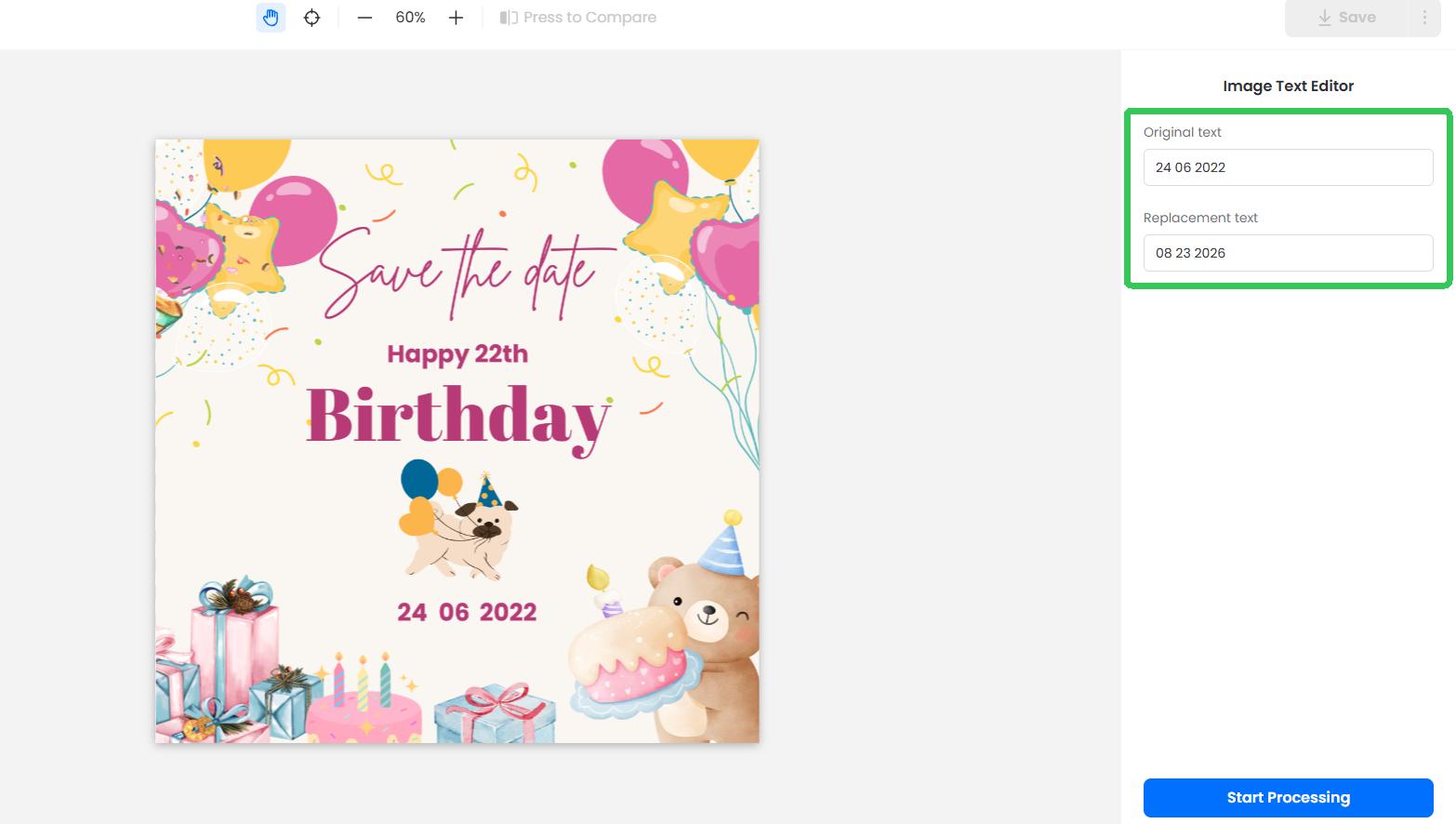
This works particularly well for small corrections in AI-generated posters, social graphics, ads, or YouTube thumbnails.
48. Change the Background
Prompt:
Keep the person exactly as they are, including the face, hairstyle, pose, clothing, and proportions. Replace only the background with a modern professional office featuring large windows and soft natural daylight. Match the original lighting and depth of field.
49. Turn a Product Photo Into an Ad
Prompt:
Keep the uploaded product completely unchanged. Place it in a premium advertising scene with a dark gradient background, realistic reflective surface, controlled studio lighting, and subtle atmospheric effects. Leave clean negative space on the left for marketing text.
50. Expand an Image
Prompt:
Extend this image to a 16:9 landscape format. Keep the original subject unchanged and centered naturally within the new composition. Continue the existing background, lighting, textures, shadows, and environmental details seamlessly into the newly generated areas.
How to Use These ChatGPT Image 2.5 Prompts
Using these prompts is simple:
- Choose a prompt that matches the image you want to create.
- Copy and paste it into ChatGPT.
- Replace placeholders such as [PRODUCT], [BRAND NAME], or [NEW TEXT] with your own details.
- Add specific instructions for the background, lighting, colors, text, or aspect ratio.
- Generate the image and refine it with follow-up prompts if needed.
For example, instead of generating a completely new image, you can say:
“Keep everything else the same, but make the background lighter and move the product slightly to the right.”
For image editing, upload your original image and clearly state both what should change and what should remain unchanged.
Final Thoughts
The best ChatGPT Image 2.5 prompts are clear, flexible, and easy to customize. Use these 50 prompts as starting points, then adjust the subject, colors, background, text, style, or aspect ratio to match your needs. For better results, refine a good image with small follow-up edits instead of generating everything again from scratch.


Leave a Comment