


Some tools handle complex office graphics easily, while others excel at vertical speech bubbles in webcomics. Here is a practical breakdown of how top image translation software actually performs in real-world scenarios.
Part .1 | Direct Solution: Online Image Translator
For quick browser tasks, LightPDF is easily your best bet as an online image translator. No paywalls, no mandatory account sign-ups, and zero software downloads required—just drop your file in and get clean results for invoices, ad banners, or long screenshots.
Key Strengths & Real-World Performance
Cheap tools usually plaster ugly text boxes right over your artwork, ruining the entire layout. LightPDF avoids that headache. It actually wipes the old lettering, blends the background seamlessly, and picks a matching font style and color so the new text looks like it was always part of the image. It runs smoothly inside browser windows across PC, Mac, and mobile devices.
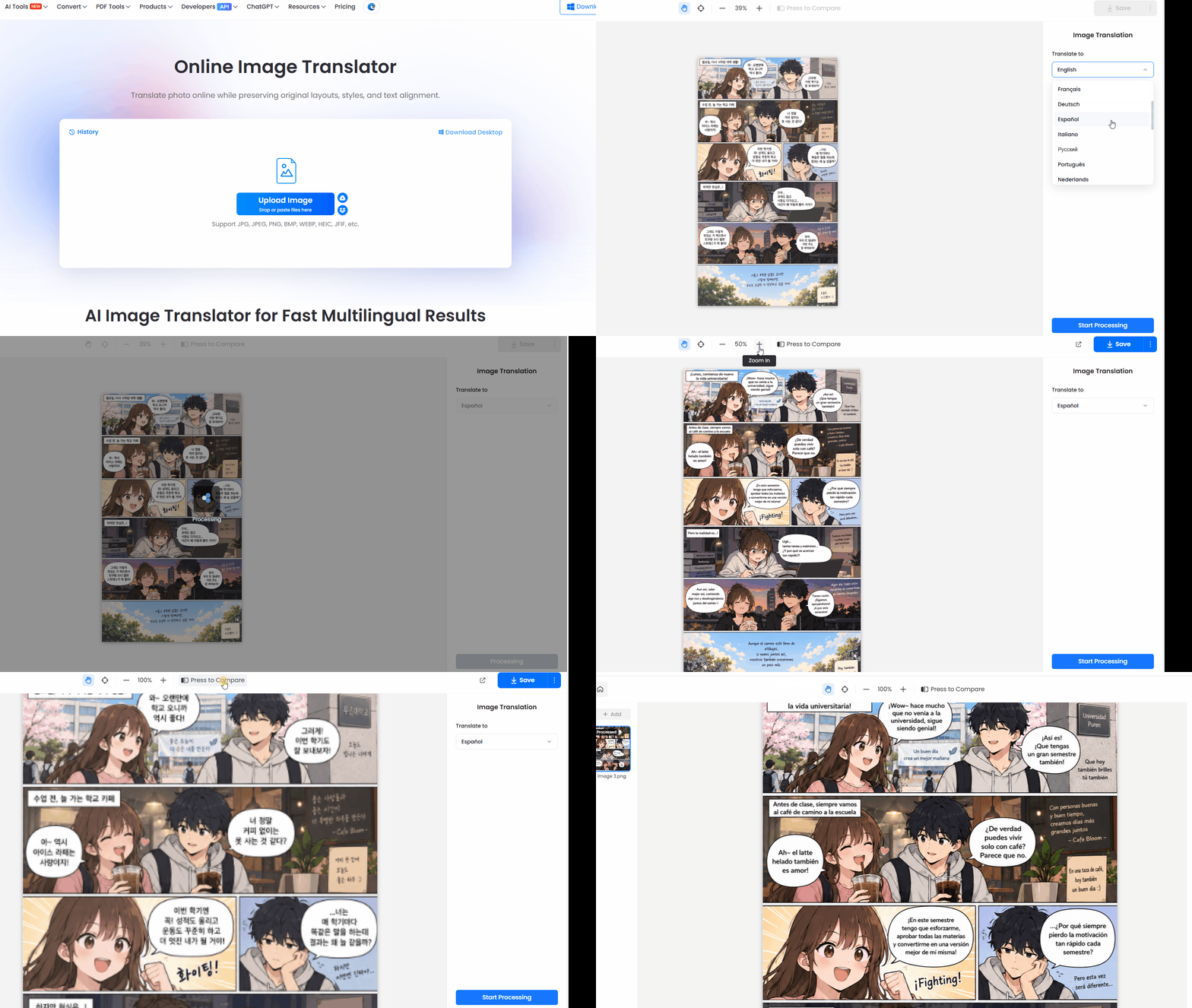
Step-by-Step Guide: How to Translate Text in Image Files
- Upload your image: Drag and drop your file into the web drop zone. It supports almost all standard image formats, including JPG, JPEG, PNG, BMP, WEBP, HEIC, and JFIF.
- Configure languages & run OCR: In the right-side control panel, select your target language from the drop-down menu and click Start Processing to launch automated text extraction.
- Preview & export: Once processing finishes, review the rendered image in the workspace. Click Save in the top-right corner to download your newly translated file.
Pro Tips for Efficiency:
- Batch Translation: Processing dozens of slides or manual pages? Click Add in the left navigation sidebar to queue multiple images at once.
- Side-by-Side Comparison: Toggle Press to Compare on the top toolbar to flip back and forth between the original photo and the translated version before downloading.
Part .2 | Alternative Tools to Translate Picture Online
No single software fits every situation. A general travel app won’t handle vertical Korean webcomics well, just as a dedicated comic tool will crash on a multi-page PDF invoice. Here is how the top alternatives stack up.
1. Google Translate
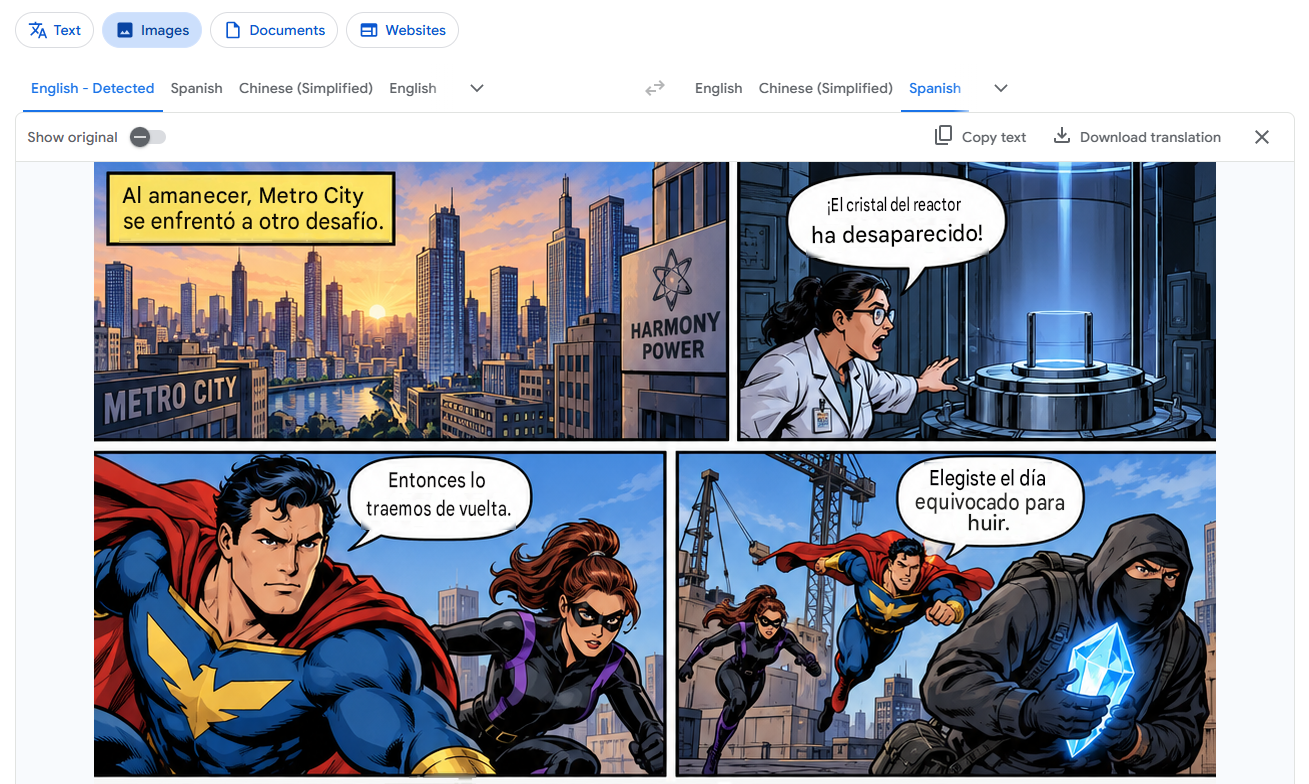
- Core Strength: Still the handiest online image translator when you’re standing on a street corner staring at a foreign road sign. Its mobile AR camera overlay works in real time without forcing you to capture static files first.
- Limitations & Edge Cases: Browser usage tells a different story. If you attempt to translate text on an image with multi-column typography or graphic design flyers on desktop, text placement often turns into a misaligned, overlapping mess.
2. Yandex Translate
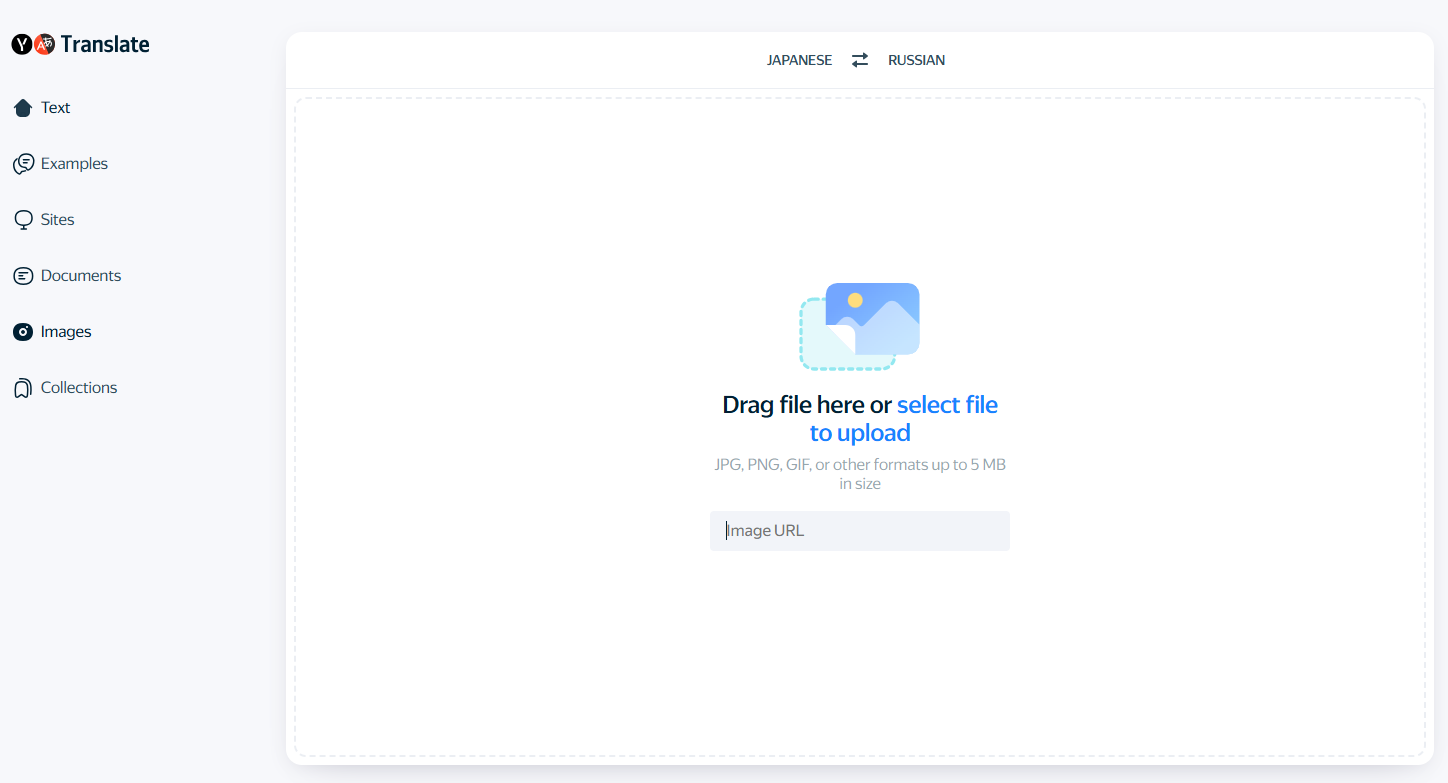
- Core Strength: A surprisingly resilient image translation online OCR engine for low-contrast shots, watermarked photos, or images with heavy background textures. Users can switch between a full-image graphic replacement overlay and line-by-line manual text selection.
- Limitations & Edge Cases: Processing speeds hit random lag spikes during peak hours, though its character recognition tolerance for blurred scans remains impressively high.
3. Mokuro
- Core Strength: An essential manga translator online setup if you read raw Japanese volumes. Standard OCR completely fails on vertical text alignment (tategaki). Mokuro uses neural models trained specifically on manga bubbles and furigana annotations to output interactive HTML files.
- Limitations & Edge Cases: Not a plug-and-play website. Setting it up requires local Python configuration or browser extensions, making it better suited for tech-savvy readers than casual web visitors.
4. ImageTrans
- Core Strength: Purpose-built for scanlation groups needing a dedicated webtoon translator, comic translator online, or manhwa translator online tool. Offers manual bubble selection, background erasers, and API switching (DeepL, Google, Baidu) for precise line art restoration.
- Limitations & Edge Cases: The interface resembles a heavy desktop editing workspace rather than a simple 1-click converter, and daily free credits are capped unless you plug in your own API keys.
Part .3 | Comparison: Top Image Translator Solutions
| Tool Name | Core Specialization | Supported Formats | Vertical Text (Manga/Manhwa) | Batch Processing |
| LightPDF Image Translator | Preserving native layout on docs & screenshots | JPG, JPEG, PNG, BMP, WEBP, HEIC, JFIF | Moderate | Yes (via Left ‘Add’ menu) |
| Google Translate | Real-time street signs & mobile travel camera snaps | JPG, PNG | Limited | No |
| Yandex Translate | High OCR tolerance on textured or noisy pictures | JPG, PNG, WEBP | Moderate | No |
| Mokuro | Specialized vertical Japanese speech bubble recognition | JPG, PNG | High (Specialized) | Yes (Folder-level) |
| ImageTrans | Full comic editing suite with bubble erasing & API switching | JPG, PNG, WEBP | High (Specialized) | Yes |
Part .4 | Specialized Niche Use-Cases
Manga, Webtoon, and Manhwa Localization
Basic document scanners completely lose their minds when trying to read vertical speech bubbles, stylized hand lettering, or noisy background screentones. If you need a reliable manga translator online or a dedicated webtoon translator, specialized platforms acting as a comic translator online or manhwa translator online are far superior. They clean out raw dialogue boxes without bleaching out line art or screentones, ensuring English text fits naturally inside dialogue bubbles.
Translating Asian Language Graphics to English
Asian fonts are notoriously tricky for regular OCR engines. Chinese, Japanese, and Korean characters get packed closely together with vertical layouts or non-standard spacing, making it easy for cheap tools to misread entire lines. So when you need to translate pic into English, picking an engine built specifically for CJK character boundaries saves you from completely scrambled, nonsense sentences.
Part .5 | FAQ
What is the easiest free way to translate text on an image?
Drag your file into a web-based online image translator like LightPDF. Select your target language, click Start Processing, and download your freshly rendered image directly from the browser without installing software.
How do I translate text in image files without ruining the background photo?
Forget about those ugly white rectangles slapped over foreign words. Tools like LightPDF clean out the old text, patch up the background art smoothly, and layer the new translation using matching font colors.
What is the best option to translate manga or manhwa scans?
Avoid standard document tools. Use an optimized manga translator online like Mokuro for raw Japanese books, or a dedicated manhwa translator online / comic translator online like ImageTrans for Korean webtoons. These engines handle vertical layouts and tight speech bubble boundaries correctly.
Can I translate pic into English in batch mode?
Yes. If you have dozens of screenshots or slides, use an image translator with multi-file queueing. In LightPDF, click the Add button in the left sidebar menu to upload your entire stack, set your target language to English, and process all files simultaneously.


Leave a Comment