


Why Do Students Need a Course Hero Downloader?
Course Hero has a lot of useful study materials, but students often want a simpler way to save accessible documents for offline review. That is where a Course Hero downloader can be helpful. It lets users turn available study files into PDFs, so they can study anytime and use AI tools to understand the content faster.
Here are the main reasons students look for one:
- Offline study: Save documents as PDFs and review them anytime, even without internet access.
- Faster review: Keep useful notes in one place instead of opening the same web page again and again.
- PDF learning tools: Upload the saved PDF to AI tools for translation, summarization, or Q&A.
- Better organization: Rename and store documents by course, topic, or exam week.
- No login for some tools: Some third-party downloaders only require a document link, but users should still avoid entering personal account details and only download files they are allowed to access.
Traditional Ways to Download Course Hero Documents
Before trying third-party downloader sites, it is better to understand the official and safer ways to access Course Hero documents.
Method 1 : Take Screenshots and Combine Them into One PDF
If you have already unlocked the Course Hero document, one simple way to save it offline is to take screenshots of each page and combine them into a single PDF.
Here is how to do it:
- Open the unlocked Course Hero document in your browser.
- Scroll through the document page by page.
- Take screenshots of each page and save them in one folder.
- Open a PDF tool that supports image-to-PDF or PDF merging.
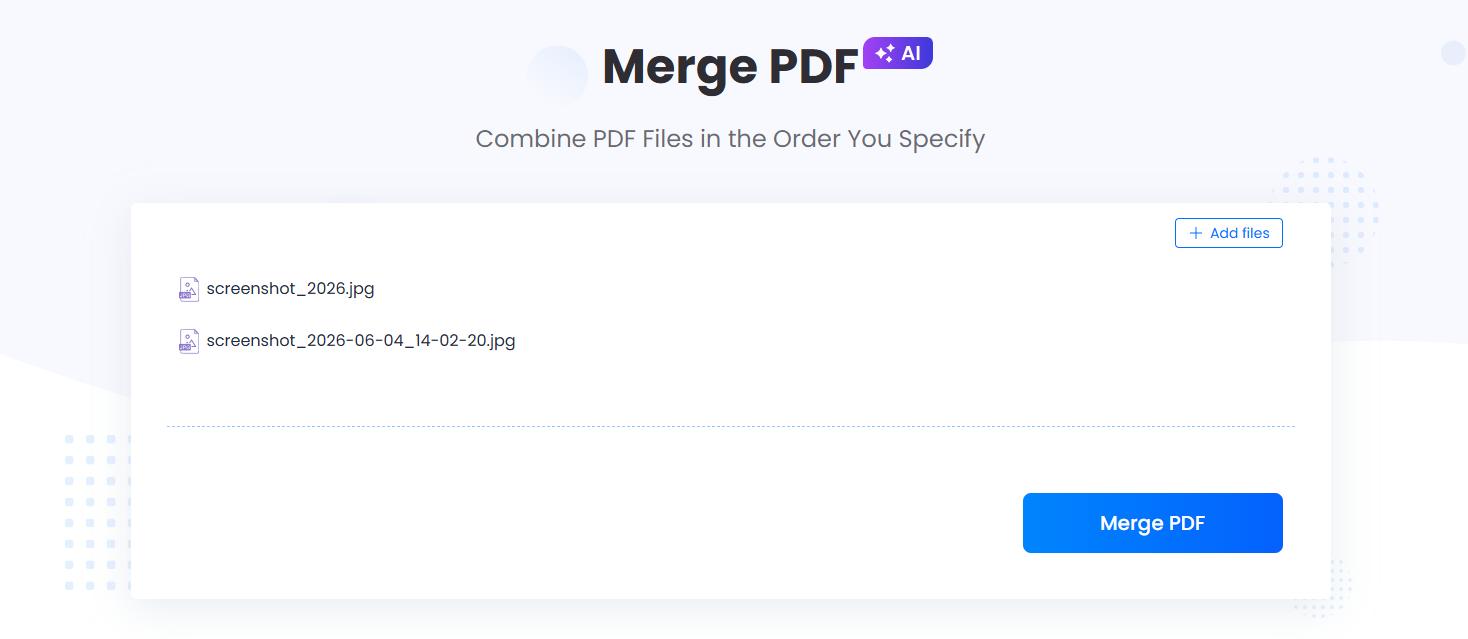
- Upload all screenshots in the correct order.
- Combine them into one PDF file.
- Rename the file and sve the final PDF for offline reading and study review.
Method 2: Use the Browser Print Feature
If the Course Hero document is unlocked and fully viewable in your browser, you may be able to save it as a PDF using the browser’s print feature. This is one of the easiest manual methods because it does not require an extra Course Hero downloader.
Here is how to do it:
- Open the unlocked Course Hero document in your browser.
- Press Ctrl + P on Windows or Cmd + P on Mac.
- In the print window, choose Save as PDF as the destination.
- Adjust the layout, page range, margins, or scale if needed.
- Click Save.
- Choose a folder on your device.
- Rename the PDF and save it for offline study.

Method 3: Earn Free Unlocks by Uploading Original Study Materials
Course Hero allows users to earn free unlocks by uploading their own original study materials. This is one of the safer course hero free download methods because it uses Course Hero’s official system instead of an unknown third-party site.
Here is how to do it:
- Log in to your Course Hero account.
- Upload your own original study materials.
- Wait for Course Hero to process and approve the upload.
- Use the earned unlocks to access study documents.
- Download or save the unlocked document if the option is available.

You can upload materials such as:
- Your own lecture notes
- Original study guides
- Class summaries
- Practice questions you created
- Homework explanations written by yourself
Avoid uploading copyrighted textbooks, private exams, paid course materials, or files you do not have permission to share.
Way 4: Ask the Author or Classmate for Permission
Sometimes the best solution is not a downloader tool. If the study document was created by a classmate, tutor, or instructor, ask whether they can share a copy directly. This is safer and more respectful of copyright.
This method is useful when:
- The file was created by someone you know
- The document is based on class notes
- You need a cleaner version of the material
- You want to avoid unsafe downloader sites
A simple request like “Could you share the study guide with me for personal review?” is often safer than searching for unknown Course Hero downloader tools.
Best Course Hero Downloader Sites Online Free
Besides official methods, some users also search for third-party Course Hero downloader sites. These tools are usually designed to let users paste a Course Hero document URL and save the available file as a PDF or downloadable file.
Important note: third-party downloaders are not official Course Hero tools. Use them carefully and only for documents you own, have permission to access, or are legally allowed to download.
1. Toolesh Course Hero Downloader

Toolesh Course Hero Downloader is a browser-based tool that allows users to paste a Course Hero document link, fetch the file, and download it as a PDF. The page promotes features such as no login required, no software installation, mobile support, PDF output, and a simple copy-paste-download process.
Best for:
- Saving accessible Course Hero documents as PDFs
- Offline reading
- Preparing study files for PDF translation
- Summarizing study materials with AI
- Organizing course notes by subject or topic
Things to consider:
- It is a third-party tool, not an official Course Hero feature.
- Users should check whether they have permission to download the document.
- Avoid using any downloader to bypass locked or restricted content.
- Do not use downloaded files for plagiarism, resale, or redistribution.
2. MyDocDownloader

MyDocDownloader is another third-party document downloader site. It describes itself as an all-in-one downloader for different document-sharing platforms, including CourseHero, StuDocu, SlideShare, Academia, Issuu, and more.
The basic process is similar: users copy a document URL, paste it into the downloader box, and save the available file format to their device.
Best for:
- Users looking for a multi-platform document downloader
- Saving accessible study materials for offline reading
- Downloading documents from different study platforms
- Preparing PDF files for translation, summarization, or note-taking
Things to consider:
- It is a third-party website.
- The CourseHero Downloader page may require bot verification before access.
- Some pages may include ads or additional redirects.
- Users should only download documents they are legally allowed to save.
- Do not enter Course Hero login details into third-party downloader sites.
3. FreePDFDownloader

FreePDFDownloader offers a Coursehero Downloader page where users can paste a valid Coursehero link, convert it to PDF, and download the file after processing. The page presents a simple three-step process: input the Coursehero link, click the Convert to PDF button, and download the PDF file.
Best for:
- Users who want a direct Coursehero-to-PDF workflow
- Saving accessible Course Hero documents as PDFs
- Quick offline reading
- Preparing study files for AI PDF summarization or translation
Things to consider:
- It is a third-party downloader, not an official Course Hero feature.
- The page claims unlimited Coursehero downloads, so users should be extra careful and use it only for documents they are allowed to save.
- Avoid using it for locked, restricted, copyrighted, or unauthorized documents.
- Do not enter personal account details into third-party downloader sites.
4. DocsDownloader Coursehero Downloader
DocsDownloader is a multi-platform document downloader that includes a Coursehero Downloader tool. Its Coursehero page lets users input a document URL and get a downloadable link. The website also lists other tools for platforms such as Scribd, Everand, SlideShare, Issuu, Academia, Chegg, ResearchGate, StuDocu, Perlego, and more.

Best for:
- Users looking for a multi-source document downloader
- Saving accessible Course Hero documents for offline reading
- Working with documents from different study or document-sharing platforms
- Preparing files for PDF translation, AI summarization, or note-taking
Things to consider:
- It is a third-party website.
- It is not an official Course Hero download method.
- Users should only download documents they own, have unlocked, or have permission to access.
- Be careful with any tool that claims to retrieve content from external libraries or platforms.
Course Hero Downloader Comparison Table
| Method / Tool | Best For | Free | Safety Level | Notes |
| Screenshots + Combine into PDF | Unlocked pages | Yes | High | Manual but reliable for viewable documents. |
| Browser Print to PDF | Fully viewable documents | Yes | High | Quick, but layout may change. |
| Official Course Hero Download | Unlocked documents | Sometimes | High | Safest when available. |
| Upload for Free Unlocks | Original study notes | Yes | High | Official method, but approval may take time. |
| Ask the Author or Classmate | Shared class notes | Yes | High | Best with direct permission. |
| Toolesh Course Hero Downloader | Accessible Course Hero links | Yes | Medium | Third-party PDF downloader. |
| MyDocDownloader CourseHero Downloader | Multi-platform downloads | Yes | Medium | Avoid entering login details. |
| FreePDFDownloader Coursehero Downloader | Link-to-PDF conversion | Yes | Medium | Use only for permitted files. |
| DocsDownloader Coursehero Downloader | Multi-source downloads | Yes | Medium | Third-party multi-site tool. |
What to Do After Downloading a Course Hero PDF
Downloading a Course Hero PDF is only the first step. To study more efficiently, you can use LightPDF to translate, summarize, chat with, and organize the document for faster review.
1. Translate the PDF
If the Course Hero document is in English and you prefer another language, use a LightPDF PDF translator to translate the content while keeping the document structure. This is useful for international students who want to understand class notes, textbook explanations, or study guides more clearly.

2. Summarize the PDF
Long study documents can take a lot of time to read. LightPDF AI PDF Summarizer helps extract the main ideas, definitions, formulas, examples, and key takeaways from the file.

This is useful for:
- Exam preparation
- Chapter review
- Essay reading
- Lecture note organization
- Quick revision before class
Instead of reading every page manually, students can use LightPDF to quickly understand what the document is about and focus on the most important parts.
3. Chat with the PDF
With LightPDF ChatPDF, you can ask questions directly based on the document. This is more interactive than simply reading the file from beginning to end.

Example prompts:
- Explain this topic in simple words.
- Create quiz questions from this PDF.
- Find the most important formulas.
- Turn this document into study notes.
Recommended Study Workflow
Here is a simple workflow for using Course Hero documents more effectively:
- Search for the Course Hero document you need.
- Use official access or a permitted download method.
- Save the document as a PDF.
- Upload the PDF to a PDF translator or AI PDF summarizer.
- Extract the main points, definitions, formulas, and examples.
- Ask AI questions about difficult parts of the document.
- Turn the answers into flashcards, notes, or a study outline.
- Save the final file by course, topic, or exam week.
This workflow helps students move from simply collecting documents to actually understanding and reviewing the material.
Best Practices for Using Course Hero Documents
To use Course Hero documents responsibly, follow these best practices:
- Use documents as study references, not as final answers.
- Do not submit downloaded work as your own.
- Follow your school’s academic integrity policy.
- Verify answers with textbooks, lectures, or trusted sources.
- Do not upload copyrighted or private course materials.
- Use AI tools to summarize and understand, not to copy.
- Keep downloaded documents for personal study only.
The goal is not just to download more files. The goal is to understand the material faster and study more effectively.
Conclusion
The best Course Hero downloader is the one that helps you save documents safely and responsibly. For most students, official download options, earned unlocks, or your own uploaded files are still the safest choices.
Third-party tools like Toolesh, MyDocDownloader, FreePDFDownloader, and DocsDownloader can be useful, but they should be used with care. Avoid entering your login details, installing unknown software, or using any tool to access documents you are not allowed to download.
Once you have a permitted PDF, the real value comes from how you use it. Translate it, summarize it, ask questions with AI, convert it, or organize it into study notes. That way, a simple downloaded file becomes a more useful study resource.


Leave a Comment