


⚡ Quick Answer: The Fastest Way to Change Name in Photo Files To instantly edit name in photo assets online for free: Upload your file to an automated AI image text editor, enter the target text you want to erase alongside your new name, let the engine perform automated AI text replacement, and download your updated image in seconds.
Automated AI Text Editing Online
Using a dedicated browser tool like the Edit Text in Image Online feature on LightPDF is the fastest way to edit name on image documents, certificates, design mockups, and screenshots. The platform uses smart AI algorithms to handle complex tasks like font matching and background reconstruction automatically, allowing you to execute a seamless change name in photo update without any graphic design experience.
How to Edit Name on Pic Online
- Visit the Web Tool: Open your browser and navigate to the photo text editor online page.
- Upload Your Image: Click Upload image or drag and drop your image file directly into the editing area. You can also paste an image URL directly.
- Set Your Replacement Copy: Enter the original name currently visible on the picture into the target text field, then type your new replacement text into the destination field to trigger automated AI text replacement.
- Save Your File: Preview the rendered image output and click Save Image. If you need to distribute or share it immediately, click the three-dot icon on the save button to upload or share the file directly.
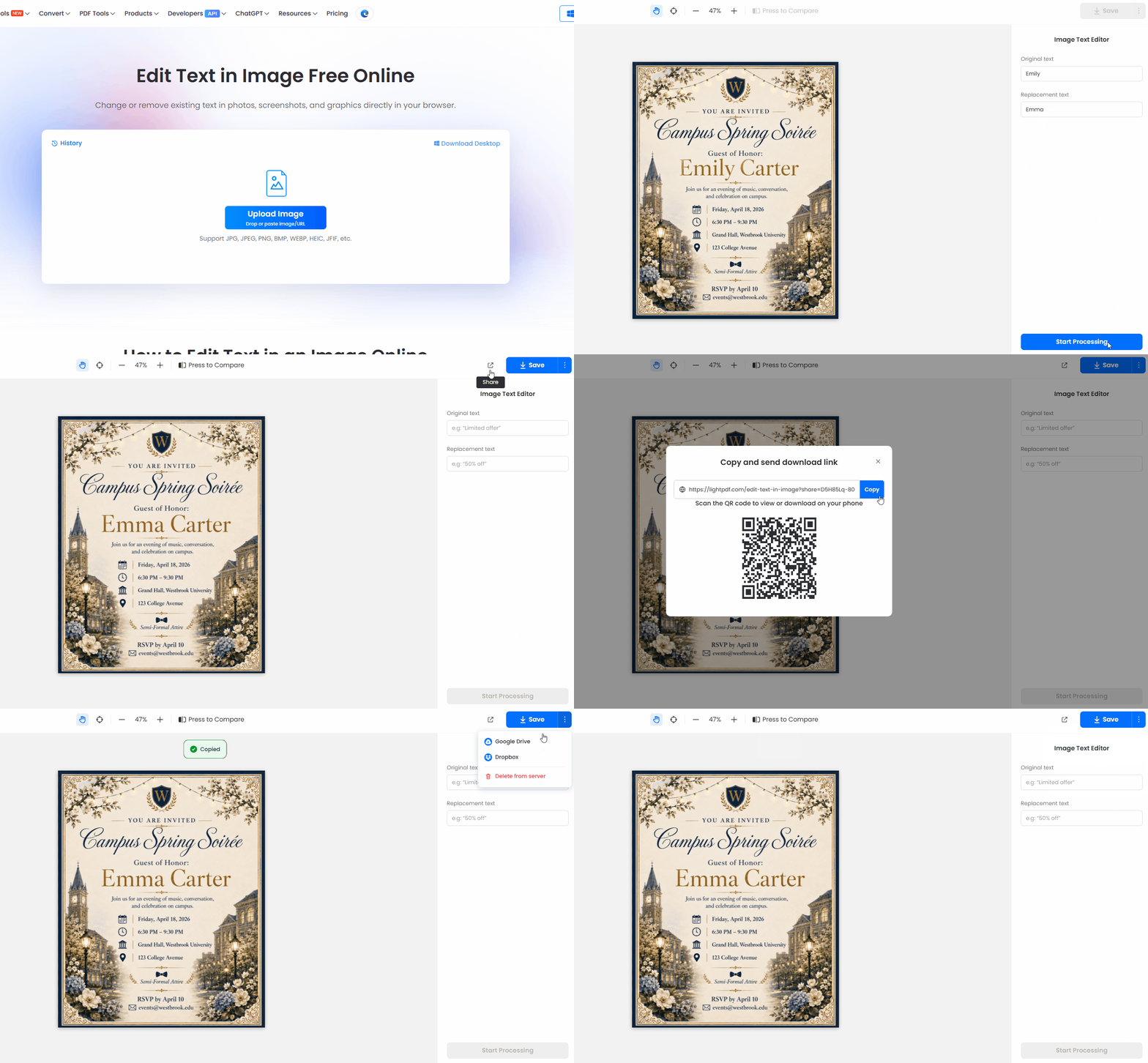
Key Features & Capabilities:
- Edit Text in Image Free Online: Effortlessly change or remove existing text in photos, screenshots, and promo graphics directly in your browser without paywalls or manual layer management.
- Automated AI Text Replacement: Easily replace text in image files by matching original fonts, background textures, and line heights without requiring manual brush or clone stamp work.
- Wide Format Support: Full support for major image extensions including JPG, JPEG, PNG, BMP, WEBP, HEIC, and JFIF.
- Browser-Based Utility: Operates as a lightweight online image text editor across Windows, macOS, iOS, Android, and Linux platforms.
- Privacy & Security Protection: Auto-deletes files from cloud processing servers shortly after download to keep sensitive receipts, business cards, and personal records confidential.
Common & Authorized Use Cases
Online image text tools provide immense value across various personal, academic, and business workflows. Popular authorized scenarios for replacing names on images include:
- Event & Workshop Personalization: Updating participant names on digital invitation cards, event banners, and presentation slides.
- Corporate Asset Maintenance: Modernizing team organizational charts, replacing outdated contact details on marketing materials, or standardizing internal badge mockups.
- Template Design Customization: Personalizing reusable design templates, certificate placeholders, or social media graphics for client deliverables.
- Correcting Typographical Errors: Instantly fixing misspelled names or incorrect dates on promo flyers, business infographics, and web screenshots.
Alternative Solutions for Name Editing Across Platforms
Depending on your file types, technical setup, and desired degree of editing control, several secondary tools are available for executing a photo edit date and name modification:
1. Desktop Graphics Editors (Photoshop, GIMP)
For high-resolution assets or complex compositions, professional desktop editors offer complete control over letter spacing, font matching, and pixel adjustments.
- Best For: High-detail graphics and heavy production workflows requiring edit name in photo ultra-high-definition exports.
- Method: Erase the target text with the Spot Healing Brush or Content-Aware Fill, then add a new text layer using a matching font family.
2. Mobile Editing Apps (PicsArt, Snapseed, Canva Mobile)
If you are working directly from a phone or tablet, mobile photo editors let you edit name on pic graphics with quick touch controls.
- Best For: On-the-go social media graphics, photo notes, and camera uploads.
- Method: Load the image into Canva or PicsArt, apply the object removal tool over the name, and overlay a replacement text box.
3. Vector & Document Processors (Adobe Acrobat, Illustrator)
When working with scanned documents or vector graphics, using vector editing software keeps document typography crisp.
- Best For: Scanned business papers, digital ID badges, and PDF-embedded images.
Comparison: Tools for Editing on Images
| Editing Method | Best Use Case | Ease of Use | Speed | Key Advantage |
| LightPDF AI Text Editor | Online image text replacement & quick fixes | Very Easy | Instant (< 10s) | Automated background & font matching; no install needed |
| Photoshop / GIMP | Complex, multi-layer graphics & 8K photos | Advanced | Manual (5–15 mins) | Pixel-perfect control, custom font matching, print-ready output |
| Mobile Apps (PicsArt) | Quick smartphone edits & social media pics | Easy | Fast (1–3 mins) | Direct camera-to-edit workflow on mobile devices |
| Vector Editors (Illustrator) | Scanned vector designs & SVG graphics | Moderate | Moderate (3–5 mins) | Preserves sharp typography without loss of resolution |
FAQ
1. How can I edit name in photo without altering the original background?
AI-powered tools like LightPDF automatically detect and reconstruct the image texture behind existing text. The software erases the original characters, fills in the underlying pattern, and applies the replacement text in one step.
2. Can I perform a photo edit date and name change on scanned receipt or badge images?
Yes, as long as the original scan is clear. Upload your image file, enter the existing date or name in the search field, and type the updated details. Always ensure edits are intended for legitimate administrative or presentation purposes.
3. What is the maximum resolution supported when performing a name edit in image online?
Standard web editors handle typical web and mobile image sizes smoothly. For ultra-high-resolution files—such as edit name in photo projects—desktop software like Photoshop or specialized cloud processors maintain original pixel dimensions and DPI without quality loss.
4. Is it possible to edit name on image free online without creating an account?
Yes. Web-based utilities offer direct guest access for formats like JPG, PNG, and WEBP, allowing you to edit and download files without registering.
5. Will my uploaded private photos and documents remain safe on processing servers?
Reputable processing platforms use automated deletion protocols that permanently wipe uploaded images from cloud servers shortly after downloading.


Leave a Comment