


PDF.net is the kind of online PDF tool people open when they want to finish one document task quickly. Compress a file. Split a few pages. Convert a PDF. Add text or sign a form. No desktop software, no long setup.
For simple files, that is convenient.
The part worth slowing down for is the upload. A public brochure or school worksheet is one thing. A contract, invoice, bank statement, scanned ID, or internal business report is different. Once a file is uploaded to an online PDF editor, the question is no longer only “Does it work?” It becomes “Should I upload this file here?”
This PDF.net review gives a direct answer to the main concerns: is PDF.net safe, is PDF.net free, is PDF.net legit, what do PDF.net reviews say, and when does a PDF.net alternative like LightPDF make more sense?
Quick Answer
| Question | Answer |
|---|---|
| Is PDF.net safe? | PDF.net can be suitable for simple, non-sensitive PDF tasks. For confidential files, users should be careful because online PDF editing requires file upload and processing. |
| Is PDF.net free? | PDF.net is not a fully free PDF editor for the complete workflow. It may allow users to build or edit a PDF, but downloading or accessing some features can require payment. |
| Is PDF.net legit? | Yes. PDF.net appears to be a real online PDF service with tools for editing, signing, converting, compressing, merging, splitting, and organizing PDFs. |
| What do PDF.net reviews say? | Reviews are mixed. Many users like its ease of use, while some complain about billing expectations or finding out about payment late in the process. |
| Best PDF.net alternative | LightPDF is a better fit for OCR, AI PDF tools, scanned PDF enhancement, PDF translation, e-signature, invoice autofill, and complete PDF workflows. |
Part 1. What Is PDF.net?
PDF.net is a browser-based PDF editor. Its website lists tools for editing text, merging PDFs, splitting files, signing, annotating, rearranging pages, converting files, compressing PDFs, and using AI-related PDF tools. PDF.net also says it supports file formats such as PDF, DOC, DOCX, PPT, PPTX, PNG, and JPG.
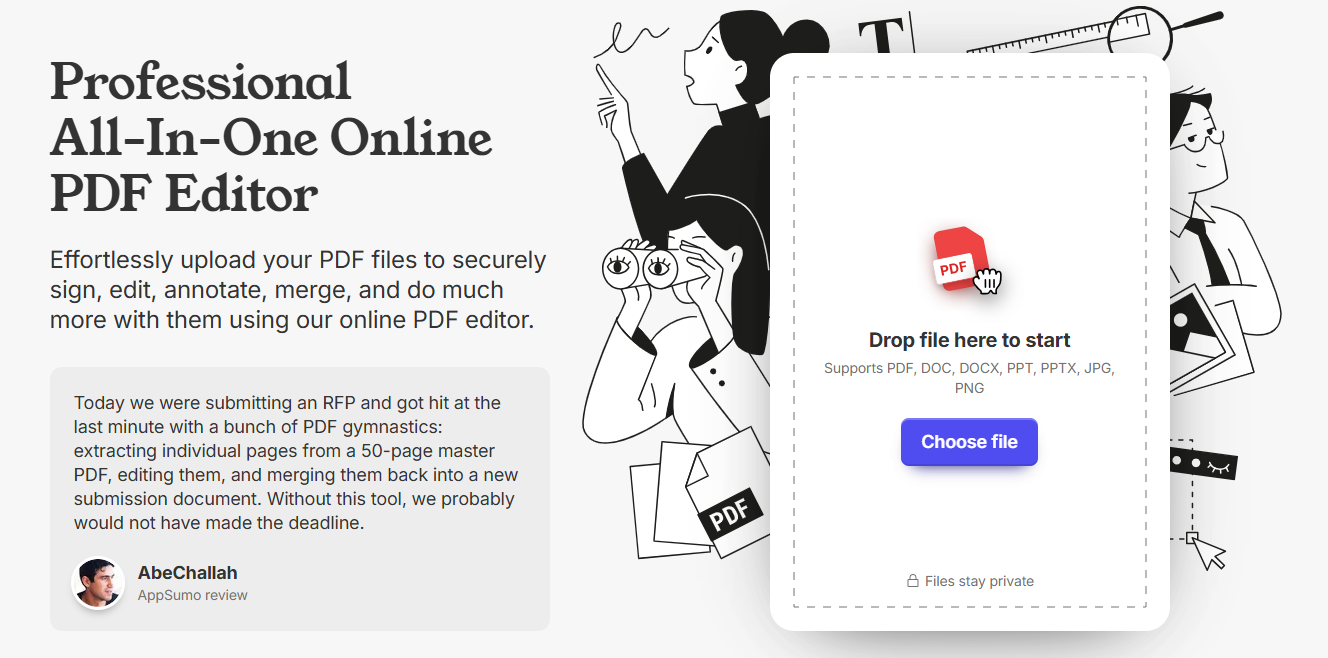
The normal workflow is simple:
Upload a file.
Edit or process it online.
Download the finished document.
That works well when the job is small. If you only need to rotate one scanned page or compress a PDF before sending it by email, PDF.net can save time.
But PDFs are not all the same.
A clean text PDF is usually easy to process. A scanned PDF may need OCR. A bank statement with tables can lose structure during conversion. A contract with signatures and payment terms should not be treated like a random sample file.
That is why PDF.net is better viewed as a quick online PDF utility, not a tool for every kind of document.
Part 2. Is PDF.net Safe?
PDF.net can be safe enough for basic, non-sensitive files. I would be more careful with private or business documents.
PDF.net says its editor uses HTTPS encryption and safety protocols to keep files private and protected. That is a useful baseline. It means the site is not just an unsecured upload page.
Still, HTTPS does not answer every privacy question. Online PDF tools need to receive and process the file. For public or low-risk documents, that may be acceptable. For sensitive documents, it is a different decision.
PDF.net is more suitable for:
- Public PDFs
- School worksheets
- Non-sensitive forms
- Small files that only need compression, splitting, or rotation
- Documents without personal, financial, or business information
Be more careful with:
- Contracts
- Invoices
- Bank statements
- Tax files
- Scanned IDs
- Customer records
- Internal company reports
- Files with signatures or payment details
So, is PDF.net safe? For basic files, yes, it can be safe enough. For sensitive PDFs, check the privacy details first or use a PDF tool that gives you stronger control over the document workflow.
Part 3. Is PDF.net Free?
PDF.net is not fully free in the way many users expect.
PDF.net’s help center says users can build a PDF document at no cost, but it also says users need to subscribe to premium plans to access certain features. That means the free part does not always cover the full edit-and-download workflow.
PDF.net’s own blog also says users can complete a task and “pay upon downloading,” then lists three pricing options.
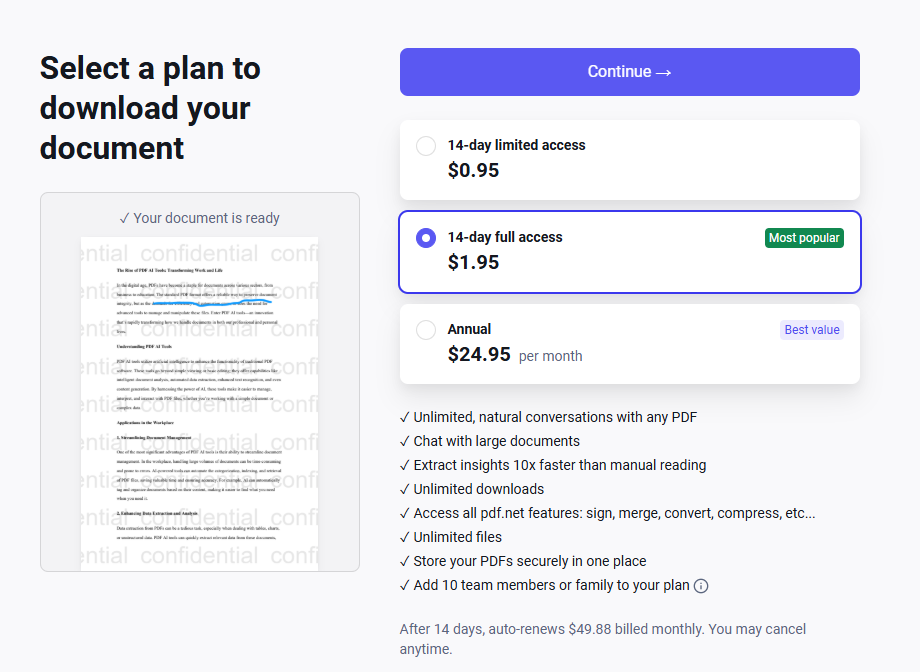
This is the part users should know before spending time editing a document.
For one quick file, PDF.net may still be affordable. But it should not be described as a completely free PDF editor. If your goal is to edit and download a finished PDF without paying, check the download step early.
Part 4. Is PDF.net Legit? What Do Reviews Say?
PDF.net appears to be legit. It has a functioning website, listed PDF tools, a help center, public terms, and customer reviews.
Trustpilot currently shows PDF.net with a 4.2 rating from 702 reviews. Many reviews are positive, especially around ease of use and speed. The same page also shows 18% 1-star reviews, so the feedback is not completely one-sided.
The common positive feedback is easy to understand: PDF.net is fast, browser-based, and simple enough for basic PDF tasks.
The complaints are mostly about billing expectations. One Trustpilot review shown on the page says the user liked the product but only learned after doing the work that they would be billed for a “free PDF editor.” Trustpilot also shows that PDF.net replies to 69% of negative reviews and usually responds within 48 hours.
So the answer is not “PDF.net is fake.” A fairer answer is:
PDF.net is a real PDF tool, but users should understand the pricing and download flow before relying on it.
Part 5. Where PDF.net Works Well
PDF.net works best when the task is simple and the file is not private.
It is useful for:
- Compressing a PDF
- Merging several files
- Splitting pages
- Rotating pages
- Adding text or simple edits
- Signing a basic PDF
- Converting common document formats
The biggest advantage is speed. You do not need to install anything or learn a heavy PDF program.
That is enough for many small jobs.
Part 6. Where PDF.net Feels Limited
PDF.net is less convincing when the document needs deeper processing.
Scanned PDFs are the first example. A scanned PDF is often just an image of text. If OCR is weak or unavailable for the task you need, the exported text can come out with broken lines, missing words, or strange spacing.
Tables are another common problem. Invoices, bank statements, and business reports often need cleaner structure than a basic converter can provide.
PDF.net may feel limited if you need:
- OCR for scanned PDFs
- AI PDF summaries
- Chat with PDF
- PDF translation
- Scanned PDF enhancement
- Clean conversion for tables
- Image watermark or text removal
- Invoice autofill
- A fuller PDF workflow for repeated work
For casual PDFs, PDF.net is practical. For scanned, sensitive, or business documents, LightPDF is usually a better fit.
Part 7. Better Alternative to PDF.net for Safe PDF Editing
LightPDF is a stronger PDF.net alternative when the PDF task goes beyond simple editing or conversion.
The reason is workflow.
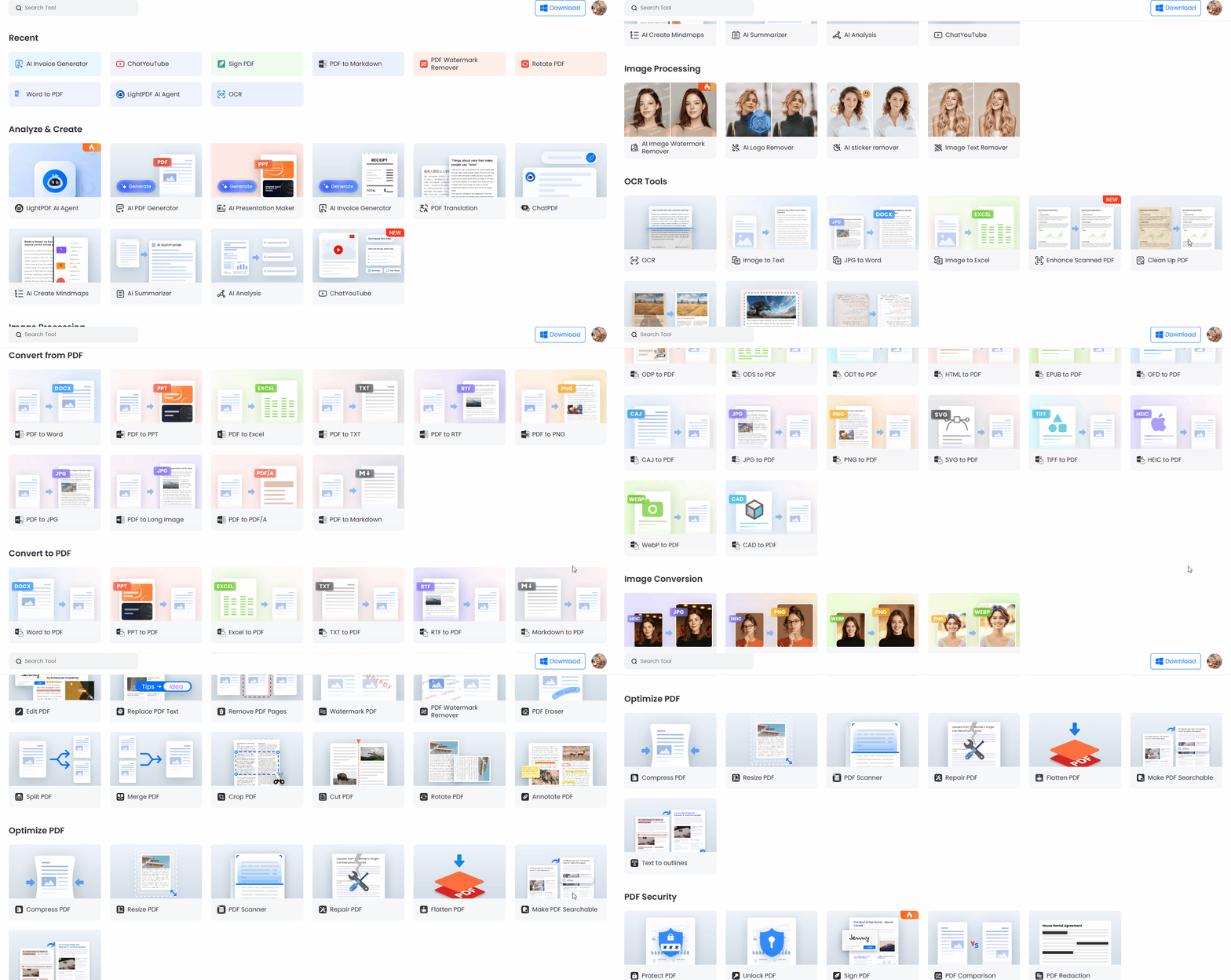
A real document task is often not just “edit this PDF.” You may need to improve a blurry scanned file, run OCR, convert it to Word, summarize the content, translate a few pages, sign the document, or extract invoice information.
PDF.net is better for quick browser-based actions. LightPDF is better when the file needs more work.
For example, if you have a scanned report before a meeting, speed alone is not enough. You may need clearer pages, searchable text, a summary, and an editable export. That is where LightPDF makes more sense.
PDF.net vs LightPDF
PDF.net covers many common online PDF tasks, which is enough for quick editing, conversion, compression, and page management. LightPDF is more suitable when the PDF workflow goes beyond basic PDF handling, especially for OCR, AI document work, scanned PDF enhancement, image processing, and invoice automation.
| Feature | PDF.net | LightPDF |
|---|---|---|
| PDF Editing | Edit text, add text, add images, annotate, rearrange pages | Edit text and images, annotate, replace content, add/remove pages, merge, split, crop, rotate, compress, optimize PDFs |
| PDF Conversion | PDF to Word, Excel, PowerPoint, CSV, JPG, PNG; Word, PPT, JPG, PNG, MD to PDF | Convert PDFs to Word, Excel, PPT, TXT, PDF/A, Markdown, and more; convert Word, PPT, Excel, HTML, images, and other formats to PDF |
| PDF Organization | Merge, split, extract pages, rotate pages, add page numbers | Merge, split, extract, rearrange, crop, rotate, compress, and organize PDF pages |
| PDF Compression | Compress PDF files | Compress and optimize PDF documents |
| Security Tools | Unlock PDF, Protect PDF | Protect PDF and manage document workflows |
| E-signature | Sign PDF, request signature, remove signature background | PDF signing and document workflow tools |
| AI Features | Chat PDF, PDF Summarizer, AI PDF Generator | AI Agent, ChatYouTube, AI PDF Generator, PDF Summarizer, PDF to Mind Map, Prompt to PPT, PDF Translation |
| OCR & Text Extraction | Limited tools | Image to Text, OCR scanned PDFs, JPG to Word, Image to TXT |
| Image Processing | Basic image-to-PDF conversion | Image watermark remover, logo remover, sticker remover, image text remover, HEIC/WebP/PNG/JPG conversion |
| Invoice & Automation | Not available | Autofill Invoice from text input or uploaded files |
| PDF Quality Enhancement | Not available | Enhance PDF quality and improve unclear scanned documents |
For simple PDF edits, PDF.net may be enough. But if the document is scanned, unclear, image-based, or part of a business workflow, LightPDF gives users more tools in one place instead of forcing them to switch between different services.
Final Verdict
PDF.net is a real online PDF editor. It is useful for quick, low-risk PDF tasks such as editing, converting, compressing, merging, splitting, signing, and organizing pages.
But it is not the best choice for every file.
PDF.net can be convenient for simple documents. For confidential files, scanned PDFs, OCR work, AI PDF analysis, business reports, invoices, or repeated document tasks, LightPDF is the better PDF.net alternative.
The most important point is simple: PDF.net may let users start editing quickly, but the complete workflow is not always free. Check the download and subscription terms before editing an important file.
FAQ
Is PDF.net safe?
PDF.net can be safe enough for simple, non-sensitive PDF tasks. For contracts, invoices, bank statements, scanned IDs, or business records, use more caution because the file must be uploaded and processed online.
Is PDF.net free?
PDF.net is not fully free for every workflow. Its help center says users can build a PDF at no cost, but premium plans are needed for certain features. PDF.net’s own blog also says users can pay upon downloading.
Is PDF.net legit?
Yes. PDF.net appears to be a legitimate online PDF service with real PDF tools. The bigger issue is whether its pricing, privacy approach, and feature limits match your needs.
What do PDF.net reviews say?
PDF.net reviews are mixed. Trustpilot currently shows a 4.2 rating from 702 reviews, with many users praising ease of use and others raising billing-related concerns.
What is PDF.net used for?
PDF.net is used for online PDF editing, signing, conversion, compression, merging, splitting, annotating, and page organization.
What is the best PDF.net alternative?
LightPDF is a strong PDF.net alternative for users who need PDF editing, conversion, OCR, AI PDF tools, scanned PDF enhancement, e-signature, image tools, and invoice autofill.
Should I use PDF.net for confidential documents?
Use caution. PDF.net may be fine for everyday files, but confidential documents need stronger privacy consideration. For contracts, invoices, financial files, or scanned business documents, LightPDF is a safer and more complete option.


Leave a Comment