


1. How to Batch Convert PDF to EPUB Online (Step-by-Step)
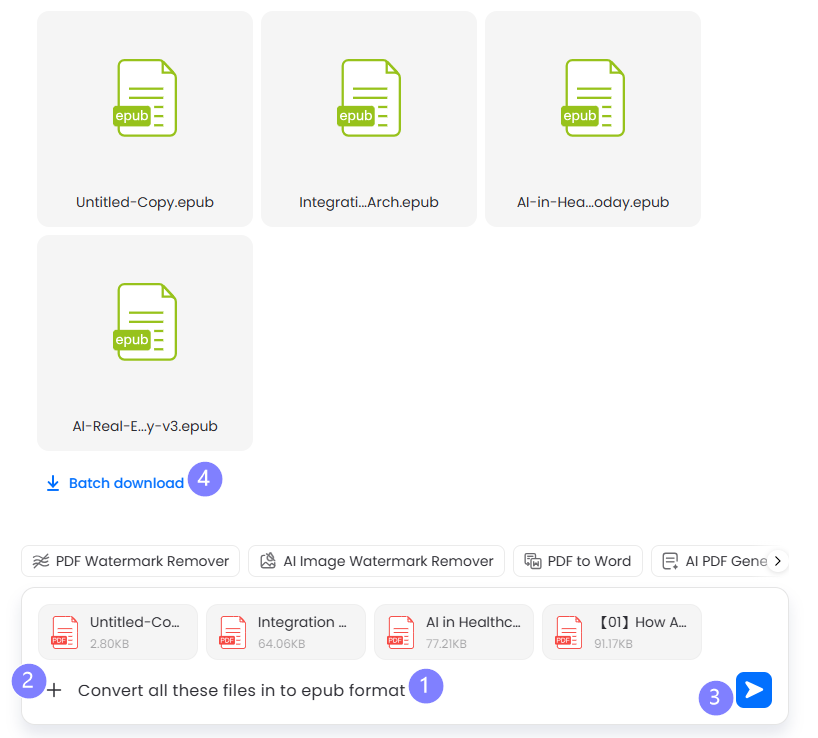
Most browser converters make you process files one at a time or dig through confusing margin and font settings. Using an AI PDF to EPUB format converter handles single or multiple files through one plain-English instruction:
- Upload Your Documents: Open PDF to Epub online converter in your browser and upload one or several PDF files at once.
- Send the Conversion Prompt: Type “convert this file to epub” in the message box and click Send. (If your PDF is an image-only scan rather than selectable text, instruct the AI to “run OCR and convert to epub” so it extracts the text layer first).
- Let the AI Restructure the File: The agent automatically converts your files from PDF to EPUB in the background, reorganizing chapters and paragraphs into clean reflowable text.
- Download Your EPUBs: Once the converted files appear in the chat window, click Download to save the .epub files to your device.
A quick note on layout limits: Converting from PDF to EPUB works reliably for novels, essays, business books, and single-column reports. If a source PDF relies on dense mathematical equations, multi-column academic grids, or fixed comic panels, reflowing the text into EPUB can still cause visual elements to shift.
2. Platform Guides: Kindle, Apple Books & Amazon KDP
Once you create EPUB from PDF, each reading ecosystem uses a different workflow to import or publish the file.
📍 Convert PDF to EPUB for Kindle (And Send Wirelessly)
Amazon retired legacy MOBI uploads and now uses EPUB as its standard format for personal documents. When you convert PDF to EPUB for Kindle, you unlock native font customization, dark mode text inversion, and built-in dictionary lookup.
- Go to Amazon’s official Send to Kindle web uploader (amazon.com) and sign in to your Amazon account.
- Drag and drop your converted .epub file (up to 200MB per file) into the upload window.
- Keep “Add to your library” checked so WhisperSync backs up your reading progress, notes, and highlights across all Kindle devices and mobile apps, then click Send.
📍 Move From PDF to EPUB for Apple Books
While Apple Books can open standard PDFs, switching from PDF to EPUB for books and study guides enables continuous vertical scrolling, custom background themes, and automatic night mode.
- On iPhone or iPad: Open the Files app, tap your downloaded .epub file, tap the Share icon, and choose Books. It opens immediately in Apple Books and syncs across your devices if iCloud Drive is enabled for Books.
- On Mac: Drag the .epub file directly into the Apple Books library window, or double-click the file to import it automatically.
📍 Turn PDF into EPUB for Amazon KDP (Self-Publishing)
If you are self-publishing an eBook on Amazon Kindle Direct Publishing (KDP), uploading a fixed PDF restricts font scaling for readers and often triggers quality warnings. Converting your manuscript into a clean PDF to EPUB format ensures smooth compatibility across all Kindle models.
- Verify Chapter Navigation: Open your converted .epub file in Kindle Previewer (Amazon’s free desktop validation tool) to confirm that your clickable Table of Contents and chapter breaks work properly.
- Upload Manuscript and Cover Separately: In your KDP Bookshelf, select Create > Kindle eBook, enter your book metadata, and upload the .epub file under Manuscript. Upload your cover image separately as a high-resolution JPEG or TIFF—embedding a cover image inside the EPUB itself can cause KDP to display duplicate covers.
- Keep File Size Lean for 70% Royalties: On KDP, eBooks priced between $2.99 and $12.99 earn 70% royalties minus a $0.15/MB delivery fee in the US. If your original PDF contained heavy high-resolution photos, compressing the PDF before converting keeps your file small and protects your per-sale payout.
3. When Should You Turn PDF into EPUB vs. Keep as PDF?
| Document Type | Recommended Format | Reason |
|---|---|---|
| Novels, Memoirs & Business Books | Convert to EPUB | Reflowable text adapts cleanly to any screen size or font setting. |
| Text-Heavy Articles & Reports | Convert to EPUB | Eliminates horizontal scrolling and enables native dark mode. |
| Scanned Books & Image PDFs | Convert to EPUB (with OCR) | Extracting text via OCR turns flat page scans into searchable eBooks. |
| Multi-Column Research Papers | Keep as PDF | Side-by-side columns, footnotes, and equations break when reflowed. |
| Planners, Cookbooks & Design Guides | Keep as PDF | Fixed visual layouts depend on exact page dimensions to remain usable. |
4. Frequently Asked Questions
What is the fastest way to create EPUB from PDF files in bulk?
Using an AI document agent is the fastest approach. Upload multiple PDFs into LightPDF Online Agent and send a single prompt (“convert this file to epub”) to batch process the files without configuring manual layout menus.
Why did my layout break after converting from PDF to EPUB?
Layout shifts happen when a source PDF uses fixed multi-column grids, complex tables, or unextracted scanned images. For scanned books, instruct the AI agent to run OCR during conversion. For visually complex textbooks or graphic manuals, keeping the document as a compressed PDF preserves exact page formatting.
Why should I convert PDF to EPUB for Kindle instead of sending the PDF directly?
Kindle displays PDFs as fixed-size pages, forcing you to zoom and pan around every page. Converting to the PDF to EPUB format makes the text reflowable so you can change fonts, adjust line spacing, and track reading progress smoothly across devices.


Leave a Comment