


Part.1 3 Quick Methods to Remove PDF Metadata
Depending on whether you prefer a quick web browser tool or a desktop application, choose one of these tested methods below to remove pdf metadata seamlessly.
Method 1: Use an Online PDF Metadata Remover (Fastest & Free)
If you have a couple of files and do not want to install heavy software, using an online pdf metadata remover is your best bet. We verified the PDF24 App and PDFCandy, both of which are fully operational, free, and secure.
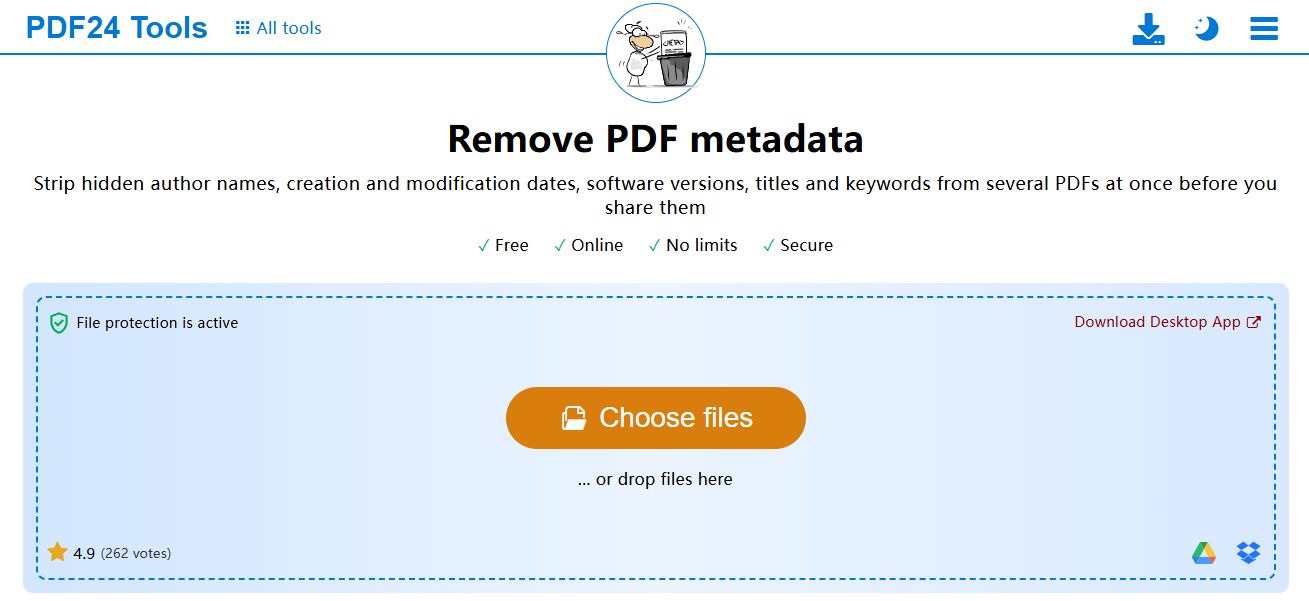
- Upload your document: Open the web app on any browser and drag your file into the upload box.
- Clear the fields: The tool will either show you the active fields (Author, Creator, Source) or offer a one-click wipe.
- Execute the clean: Click the clear button to clean metadata from pdf parameters entirely.
- Download your file: Save the newly scrubbed version back to your desktop.
Method 2: Use Adobe Acrobat Pro (Best for Desktop & Batching)
For desktop power users, Adobe Acrobat provides deep XML scrubbing to ensure no hidden structural footprints remain behind.
- Open properties: Launch your document in Acrobat, click the File menu, and select Properties.
- Wipe basic descriptions: In the Description tab, manually clear out the Title, Author, and Subject fields.
- Deep clean: To completely delete metadata from pdf hidden layers, go to Tools, choose Protection, and click Sanitize Document.
- Save: Save the document under a fresh filename to prevent overwriting your original copy.
Method 3: Use Native Windows/Mac Built-in Settings (No Software Needed)
If you are on a locked-down work computer where you cannot download software or access external web tools, you can use native tricks.
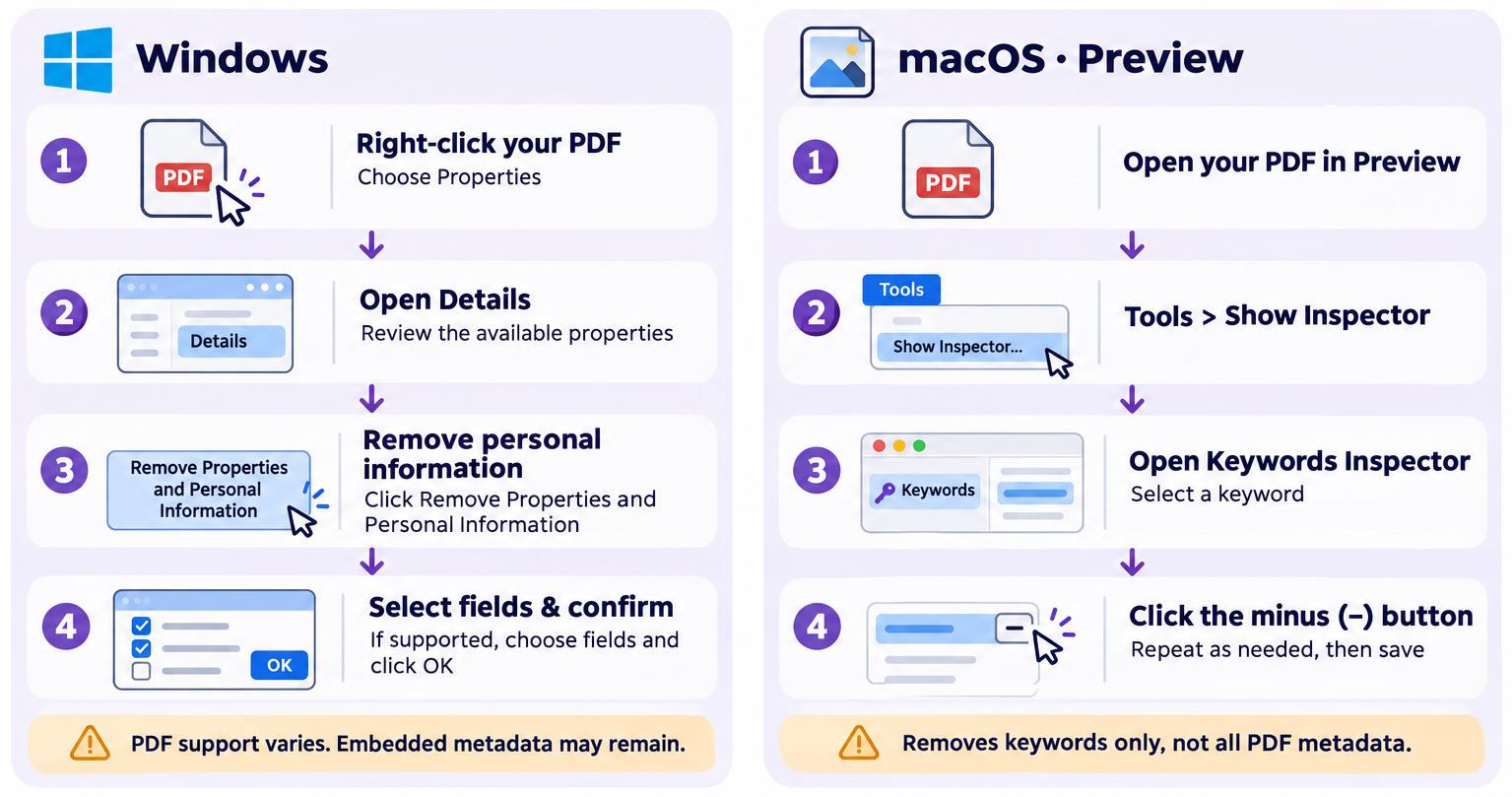
- On Windows: Right-click your PDF file, go to Properties, and click the Details tab. Click Remove Properties and Personal Information at the bottom, check the boxes you want gone, and hit apply.
- On macOS: Open the PDF using the default Preview app. Go to Tools > Show Inspector. Click the i (Information) tab, navigate to the Exif or Document tab, and manually delete or how to change pdf metadata lines that hold personal tracking details.
Part.2 Top PDF Metadata Tools Comparison
The right tool depends entirely on your specific workflow. This breakdown compares the top-rated tools for maximum privacy:
| Tool Name | Platform Type | Batch Processing | Price | Best For |
|---|---|---|---|---|
| PDF24 Tools | Online / Web Browser | Yes (Multiple files) | 100% Free | Quick, multi-file web scrubbing |
| Adobe Acrobat Pro | Desktop (Win/Mac) | Yes (Advanced scripts) | Paid Subscription | Legal firms & enterprise security |
| PDFCandy | Online / Web Browser | No (Single file free) | Free / Tiered Paid | Seeing exact metadata fields before deleting |
| Windows File Explorer | Native OS Feature | Yes | Built-in | Basic clearing without any internet access |
Part.3 Protect Your PDF Privacy
When you need to delete metadata from pdf files, a few extra workflow habits ensure your documents remain completely anonymous and clean.
- Watch out for hidden text layers: Simply using a basic text editor or standard viewer won’t remove pdf metadata structures like invisible structural XML schemas or embedded file generation tracking codes.
- Inspect the file manually: Before sharing any document online, always right-click your file or open its local properties to verify that you successfully managed to clean metadata from pdf fields like the Author name and Title.
- Use trusted tools locally: If you deal with sensitive financial or legal contracts and prefer not to use an online pdf metadata remover, run desktop apps or built-in OS properties to erase metadata pdf elements safely offline.
- Know the limits of editing: Keep in mind that learning how to change pdf metadata details manually can leave hidden creation timestamps behind unless you use deep sanitization tools.
Part.4 Common Questions
Does flattening a PDF completely delete metadata from pdf files?
No. Flattening a PDF merges visual layers like annotations, form fields, and signatures into the main background layer. It does not touch the background hidden XML or hidden text blocks that hold the author name, original creation dates, and editing software logs. You must explicitly use a tool to erase metadata pdf attributes.
Can an online pdf metadata remover handle password-protected files?
Most web utilities cannot read encrypted files. You will need to unlock or remove the password protection from the document first before uploading it to an online pdf metadata remover.
If I clean metadata from pdf parameters, will the file’s visual layout change?
Not at all. Cleaning the metadata only strips the invisible digital properties hidden inside the file structure. Your layout, fonts, text formatting, and image resolutions remain completely unchanged.
How can I verify that my attempts to remove pdf metadata actually worked?
The easiest way is to use a free tool like the Pics io Metadata Viewer or right-click the finished document on Windows to inspect its properties. If the author, company name, and software version fields are completely blank, your data is safe.




Leave a Comment