


Quick Answer: To fix an “Upload failed” error in Google Gemini Notebook (formerly NotebookLM), ensure every individual file is under 200MB and 500,000 words, keep free notebooks within the 50-source limit, convert unsupported local Office files (
.docx,.pptx,.xlsx) to PDF or Markdown (.md), and run OCR on image-only scanned PDFs.
Google Gemini Notebook operates as a read-only synthesis workspace rather than a file editor. If a file violates its strict ingestion limits or lacks a readable text layer, the platform blocks the upload or skips unreadable sections.
1. Error-to-Solution Diagnostic Matrix
Match the exact error message or symptom on your screen to the rule blocking it:
| Error or Symptom | Gemini Notebook Rule | Exact Fix |
|---|---|---|
| “File too large” error | Strict 200MB maximum per file (applies to all free and paid tiers). | Compress the PDF to a target size under 200MB (e.g., 185 MB). |
| “Source limit reached” | Free notebooks cap out at 50 sources (500,000 words max per source). | Merge related chapters, handouts, or invoices into one PDF. |
| File greyed out / unsupported | Personal accounts block direct .docx, .pptx, and .xlsx uploads. | Convert Office files to PDF or Markdown (.md) first. |
| Blank summary / missed tables | Image-only scanned PDFs and photos have no searchable text layer. | Run OCR on the scan to extract selectable text before importing. |
| 5-hour compute limit runs out fast | Bloated appendices and blank pages waste dynamic processing allowance. | Delete unnecessary pages and highlight key sections upfront. |
2. Gemini Notebook Official File & Limit Specifications
Before modifying your documents, verify your files against Google’s current source ingestion thresholds:
- Maximum File Size:
200 MBper file (Free, AI Plus, AI Pro, and AI Ultra plans). - Maximum Word Count:
500,000 wordsper individual source. - Source Count Cap:
50 sourcesper notebook on free accounts (100to300+on paid tiers). - Supported Local Formats:
PDF,TXT,Markdown (.md), audio files, and images. (Local.docx,.pptx, and.xlsxuploads require a paid Enterprise account). - Compute Refresh Window: Dynamic compute allowance resets every
5 hours.
3. Step-by-Step Fixes for Gemini Notebook Upload Failures
How to Compress PDFs Over 200MB Without Losing Clarity
To bypass the 200MB ceiling without blurring financial tables or charts, compress the PDF using a fixed target file size (185 MB) rather than a generic auto-compression slider.

- Open LightPDF Compress PDF and upload your oversized file.
- Select Compress by File Size, switch the unit dropdown from KB to MB, and enter
185to stay safely below Google’s 200MB cap. (If your PDF is only slightly over 200MB and dense with technical diagrams, use the Compression Level slider at30%instead). - Click Compress, download the optimized PDF, and import it into Gemini Notebook.
How to Combine Files to Stay Under the 50-Source Cap
Consolidating fragmented handouts or monthly reports into a single topic-based PDF frees up source slots and keeps inline citations organized.

- Group related documents by topic or date (e.g.,
Lectures_Week1-5.pdf). - Open online PDF merge, arrange your files in chronological order, and click Merge.
- Upload the combined PDF. (Important: Ensure the merged document stays under 500,000 words, or Gemini Notebook will reject it).
How to Make Scanned PDFs & Photos Readable with OCR
Running Optical Character Recognition (OCR) converts flat scanned images into searchable text so Gemini Notebook can read tables and generate accurate citations.
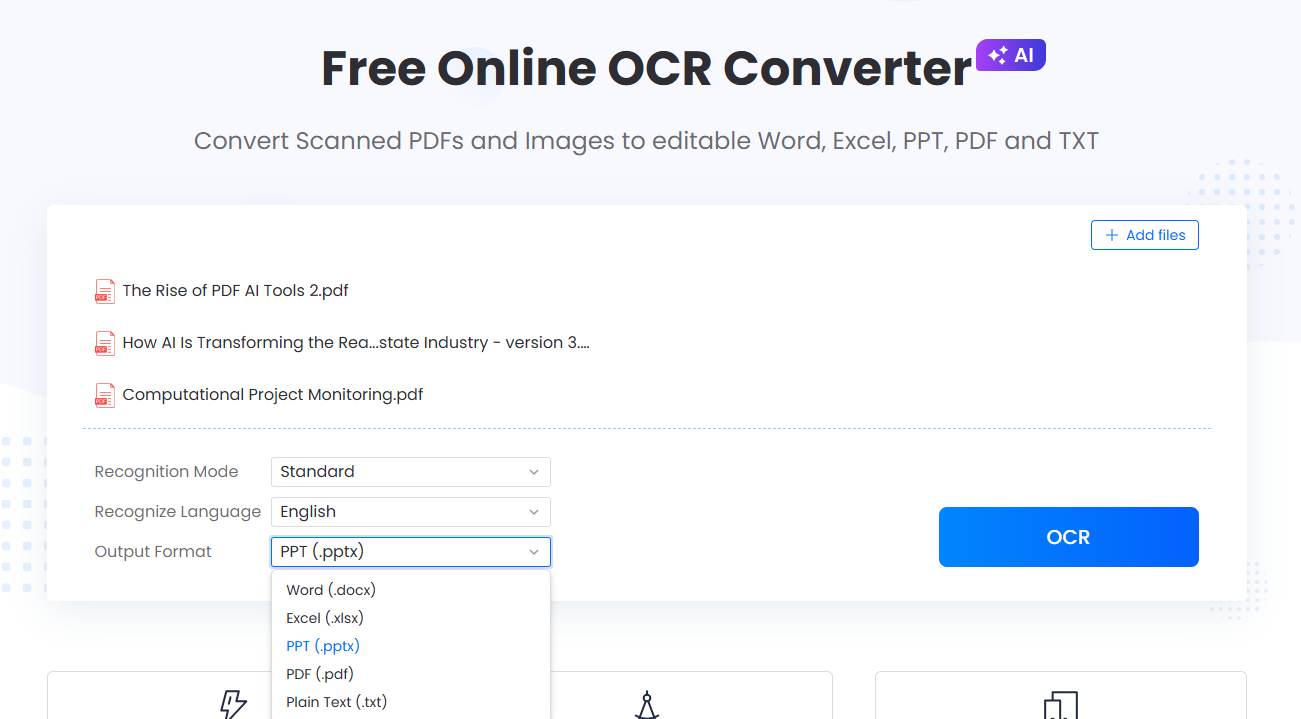
- Upload your scanned PDF or smartphone photo to online OCR converter.
- Set Output Format to Markdown (
.md) or TXT for fastest AI ingestion, or PDF to keep an online-previewable and editable layout. (Word, Excel, and PowerPoint are also supported). - Select Enhance under Recognition Mode for multi-column layouts or faint print, and choose Automatic Recognition (supports 20+ languages).
- Click Convert and upload the searchable file to your notebook.
How to Convert Local Word, Powerpoint and Excel Files First
Personal Gemini Notebook accounts block direct .docx , .pptand .xlsx uploads; converting them directly to PDF locally preserves fonts and table borders better than importing via Google Drive.

- Convert your local files straight to PDF using Word to PDF, PDF to PPT or Excel to PDF.
- (For multi-tab spreadsheets) Export only the summary sheets to PDF so raw data tabs do not flood the AI’s context window.
- Upload the converted PDF directly from your computer.
How to Trim Extra Pages & Annotate Before Importing
Deleting irrelevant appendices before uploading reduces file noise and conserves your 5-hour dynamic compute quota.

- Open your PDF in online PDF editor.
- Delete extraneous cover pages, legal disclaimers, or blank appendices.
- Highlight key clauses or add margin notes for your own reference, then save and upload the streamlined PDF.
4. Best Practices: Preparing Clean Sources for AI Synthesis
| Do (Recommended for AI Accuracy) | Don’t (Causes Errors or Quota Drain) |
|---|---|
Convert complex scanned tables to Markdown (.md) or OCR PDF first. | Upload raw smartphone photos of multi-column financial tables. |
Merge short weekly notes into structured chapter PDFs under 500,000 words. | Upload 50+ fragmented 1-page files into a single notebook. |
| Export only summary tabs from large Excel workbooks to PDF. | Convert a 50-tab raw data spreadsheet into a massive PDF. |
5. Frequently Asked Questions
Why did my PDF fail to upload when it is under 200MB?
Gemini Notebook also rejects files exceeding 500,000 words, PDFs with corrupted internal headers, and files locked with publisher copy restrictions. If you own the rights to a password-protected document you created yourself, remove the permission lock with an authorized tool before uploading.
What file format works best in Gemini Notebook?
Markdown (.md) and clean text-based PDFs work best. Markdown uploads fastest and preserves heading hierarchy, while text-based PDFs retain exact page numbers so you can verify inline citations against the original layout.
Can I edit text or export Excel tables after uploading to Gemini Notebook?
No, Gemini Notebook is strictly a read-only research environment. Fix typos in a PDF editor beforehand, or use a PDF-to-Excel converter outside the notebook to extract editable spreadsheets.


Leave a Comment