


You’ve downloaded 50 GB of upsc notes. But can you recall any of it next month? Probably not.
Most aspirants confuse collecting with learning. That stops here.
This guide is not a list of 100 websites. It’s a working system. You’ll find real pdf notes for upsc, platforms for upsc free study material pdf, and – importantly – how to make notes for upsc that survive revision week.
One warning before we start: Reading this won’t help. Doing it will.
Part 1: Why most “notes for upsc” are useless
I’ve seen aspirants with three notebooks per subject. Beautiful handwriting. Colour-coded highlights. Still failed.
Why? Because notes for upsc are not about transcription. They’re about compression.
If your note is longer than the original source, you’re doing it wrong.
The 70/30 rule
- 70% of your note = your own words, keywords, logical connections
- 30% = copied only when exact wording matters (definitions, articles, judgments)
Here’s a specific example. Most people write:
“The Comptroller and Auditor General of India is appointed by the President under Article 148. He audits all expenditure from the Consolidated Fund of India.”
That’s just copying. Try this instead:
CAG – Art 148 – President appoints – audits Consolidated Fund
Three seconds to write. One second to recall. That’s how to make notes for upsc that actually scale to 20+ subjects.
Part 2: Where to get free upsc notes that aren’t garbage
Not all upsc free study material pdf is equal. Some are outdated. Some are bloated. Some are just wrong.
Below is a table of platforms I’ve personally used or verified.
Table 1: Best sources for pdf notes for upsc (free + reliable)
| Source | Best for | What you actually get | Quirk / Limitation |
|---|---|---|---|
| PW OnlyIAS (UDAAN) | Prelims revision | 40–60 page booklets, static + current integrated | Designed for speed, not depth |
| Anantam IAS | Optional (PSIR) + concise GS | To-the-point class notes, no “filler” paragraphs | Smaller library than big coachings |
| Vision IAS (PT365) | Current affairs consolidation | Yearly compilation, exam-focused | Most useful only 4–6 months before exam |
| Prepp App | NCERTs + PYQs | Class 6–12 textbooks, solved previous year questions | App interface is better than website |
| Arihant (Pixel 1-Pager) | Visual revision | Infographics, maps, timelines | Paid book, but excerpts float around |
Pro tip: Pick ONE static source. Pick ONE current affairs source. Delete the rest. FOMO fails more aspirants than lack of material.
Part 3: How to make notes for upsc from PDFs (without burning out)
You have a 200-page PDF on Modern History. You can’t read it all. You shouldn’t.
Here’s what actually works.
Step 1 – Summarize, don’t highlight
Most people open a PDF and start highlighting yellow. That’s fake productivity.
Instead:
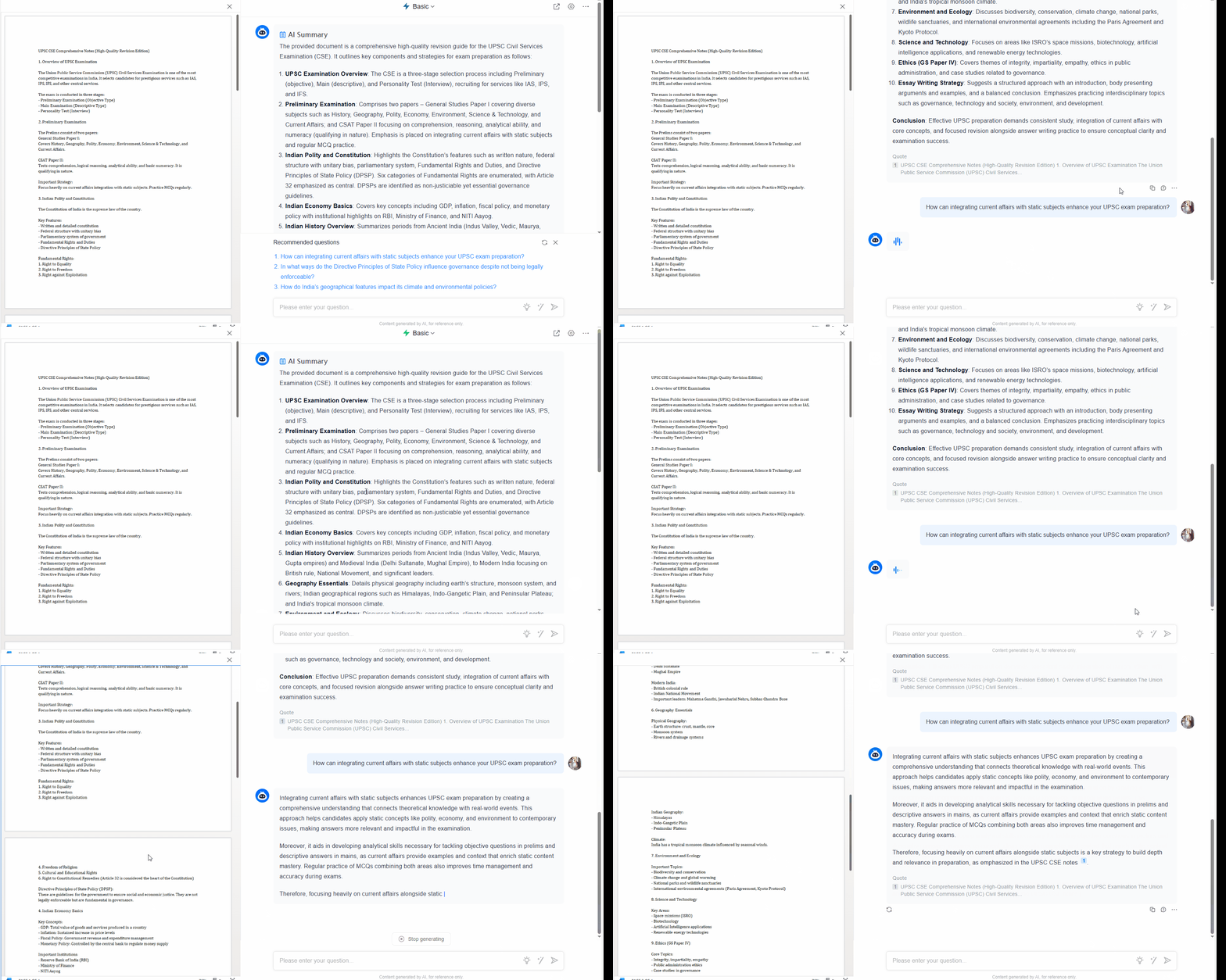
- Upload the PDF to ChatGPT or Claude
- Prompt: *“Extract only UPSC-relevant facts. Exclude stories, examples, and repetition. Give me 50 bullet points max.”*
Now you have a clean, brutal version of that PDF. That’s your first-layer upsc notes.
Step 2 – PDF to mind map
I used to struggle with Environment – too many cross-linkages. Then I tried converting a Vision IAS PDF into a mind map using CogniGuide or XMind.
What changed? Instead of reading “National Parks → associated rivers → tribes → protected status” linearly, I saw it as one image.
Prelims questions often test relationships, not isolated facts. Mind maps work because your brain processes space faster than text.
Step 3 – YouTube lectures without the time sink
A 2-hour lecture has about 20 minutes of actual high-yield content.
Use Glasp or NoteGPT. Paste the link. Get a transcript. Then ask:
“From this transcript, give me only the things that can appear as UPSC Prelims or Mains questions. Ignore anecdotes.”
I’ve turned 2 hours into 8 bullet points. That’s not cheating. That’s efficient.
Part 4: Tools that don’t feel like work
Here’s a quick comparison. No marketing.
Table 2: Digital tools for upsc notes
| Tool | What it fixes | Real limitation |
|---|---|---|
| Xodo (PDF reader) | Highlighting + annotations across devices | Free. No subscription trap. |
| Obsidian | Linking notes across subjects | Steep learning curve |
| Anki | Spaced repetition (you forget 70% in 24 hours) | Ugly interface. Works anyway. |
| CogniGuide / XMind | PDF to mind map for visual learners | OCR is shaky on scanned PDFs |
| ChatGPT / Claude | Summarizing dense NCERTs or Vision PDFs | Hallucinates. Always verify. |
One honest limitation: AI summarizers struggle with tables, maps, and diagrams. For those, nothing beats a printed PDF and a pen.
Part 5: Subject-specific note making
Polity (Laxmikanth + current)
Do not rewrite Laxmikanth. Instead:
- Create an Article Bank (one page, digital)
- Every time you see a news item about Article 356 or 370, add one line next to the article number
- Your pdf notes for upsc for Polity should be 15 pages max
Geography (NCERT + atlas)
Geography notes fail when they’re text-heavy.
Convert your upsc free study material pdf into a mind map. Physical geography is highly relational. A map shows what 10 pages of text can’t.
Ethics (GS Paper IV)
Ethics is where long notes kill you. You need keywords, not paragraphs.
Example: instead of writing “Empathy means understanding the feelings of others and acting to alleviate their suffering”, write:
Empathy → understand → act → reduce suffering
Mains answers reward keywords, not flowery sentences.
Part 6: The revision truth
You will forget 70% of your upsc notes within 24 hours. That’s normal.
The solution isn’t “willpower”. It’s system.
3-pass revision
Pass 1 (day of creation)
– Your summarized PDF or mind map
– Understand. No memorisation yet.
Pass 2 (within 3 days)
– Active recall: cover the right side of your notes, recall left side
– Mark what you got wrong
Pass 3 (at 7 days)
– Only review the wrong marks from Pass 2
– Everything else you can skip
This cut my revision time by 60%.
FAQ
Q1: Can I clear UPSC using only free upsc notes and no coaching?
Yes, but with a condition. You need upsc free study material pdf from standard sources (NCERT, PW UDAAN, Vision PT365) plus PYQs. Coaching adds structure, not secret knowledge.
Q2: How to make notes for upsc current affairs without spending 4 hours daily?
Use a monthly magazine (e.g., PT365). Copy-paste relevant 2–3 pages into ChatGPT. Ask: “Give me 5 examinable points from this.” That’s your note. 10 minutes.
Q3: Are AI-generated upsc notes reliable for revision?
Partially. AI is excellent at summarising known information. But it’s bad at identifying what UPSC actually asks. Always verify against one reliable source.
Q4: I have 100+ pdf notes for upsc on my laptop. How do I revise them?
You don’t. Delete 80%. Convert the remaining 20% into mind maps or 1-page summaries. Revision is impossible at 100 PDFs.
Q5: Handwritten or digital notes for upsc?
Hybrid. Use digital (AI summaries, mind maps) for creating. Use handwritten only for facts you keep forgetting (dates, articles, maps).
Q6: Can PDF to mind map tools handle scanned books?
Most can’t reliably. OCR on scanned upsc books pdf free download breaks on tables. Workaround: search for a text-based PDF first. If none exists, type only the essential 10% manually.
Final word
You don’t need more upsc notes. You need fewer, better, revisable notes.
One well-made mind map on Environment > ten downloaded PDFs sitting in a folder.
One summarised ChatGPT output on Modern History > a 300-page book you’ll never open again.
Stop collecting. Start compressing.
That’s how to make notes for upsc now.


Leave a Comment